
- Mark as New
- Bookmark
- Subscribe
- Permalink
- Report Inappropriate Content
Password not accepted
I use QB Desktop Pro 2020 and my computer crashed. Fortunately, I have a recent backup in the form or a *.QBB file. I purchased a new computer and installed QB Desktop Pro 2020 and choose the "Restore Company" option. It went through the process of restoring my backup file, then at the end it prompted me for the sign in password. I entered the password I have entered many times, but now it's not being accepted. Instead, I received a message saying the password is incorrect. I have made sure to enter the password correctly and case sensitive and tried with other backups, but it not accepting the correct password. Am I able to reset the password in this situation? Any other suggestions are appreciated. Thank you.
Barry


- Mark as New
- Bookmark
- Subscribe
- Permalink
- Report Inappropriate Content
Account management
I appreciate you reaching out here in the Community, Barry. I'd be glad to guide you toward resolving this so you can access your data and continue working with your QuickBooks.
Before we proceed, I'd like to ask what password you entered when logging in. Is it the Admin password or the Intuit account password?
When QuickBooks asks you to log in, you'll need to enter your Admin password that's associated to your company file.
However, if the Admin password does not work, I suggest entering your Intuit account password. If neither of them works, you can reset your password by clicking I forgot my password.
Here's how:
- Open QuickBooks and open your company file.
- Select I forgot password on the sign in screen.
- Type in your email, then select Next. An email will be send to email you've entered.
- Enter the token from your email.
However, if you're unable to reset the password, you may login through CAMPS to double-check your information if it matches.
If you have more concerns related to QuickBooks, don't hesitate to reply here. We're here to help.
- Mark as New
- Bookmark
- Subscribe
- Permalink
- Report Inappropriate Content
Account management
You can purchase a 3rd party service to reset your password. Conact @Fiat Lux - ASIA by email directly for assistance.
- Mark as New
- Bookmark
- Subscribe
- Permalink
- Report Inappropriate Content
Account management
Hi:
Thank you for the reply.
This appears to be asking for the password for the company file, but I will try the Intuit password and see what happens. If its not accepting my password, I was wondering if I am able to change the password at this stage - that maybe the password was linked to the backup file.
Also, when I restored QBs on the new computer, it completed and I was able to activate it without it ever asking me to login to Intuit as I was expecting. Could not being logging into Intuit be my problem?
- Mark as New
- Bookmark
- Subscribe
- Permalink
- Report Inappropriate Content
Account management
I understand this issue is related to a password not being accepted when trying to access your QuickBooks company file, Bar2.
Since you were able to activate it without being prompted to log in to your Intuit account, another option is to change the password of your QuickBooks Desktop Pro 2020.
Here's how:
- Open QuickBooks and access your company file.
- On the sign-in screen, select I forgot my password.
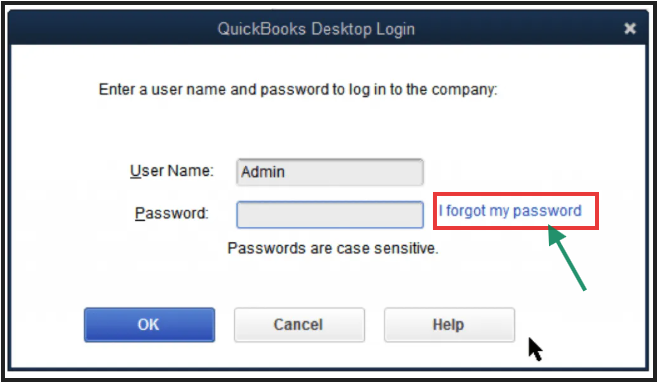
- Choose an email address from the list, then click Next. QuickBooks will email you a token to reset your password.
- If you don't see your email address listed, choose Don't see your email in the list above? and follow the on-screen instructions.
- Enter the token that was sent to your email to complete the password reset process.
Please ensure to check your spam or junk folders if you don't see the password reset code in your inbox, as emails from us may end up in those folders.
Feel free to let me know if there's anything else I can do while managing your company data. The Community is here whenever you need additional assistance, Bar2.
