
- Mark as New
- Bookmark
- Subscribe
- Permalink
- Report Inappropriate Content
Other questions
I have been getting the "subscription will expire" notice for about 10 days. Ours automatically renews each May - so we are good until May 2026. Yesterday, I had 1 day left, so I restarted QB, let all of the latest, greatest updates run, the message disappeared. Today I log into QB - my subscription has expired, I am in "read only" mode, cannot post anything in QB. Tried call the toll free number, got an automated "person". When I finally was transferred over to the human side, a recording said the office was closed, to call back during normal business hours, but did not indicated what the "normal business hours" were. I am completely dead in the water! Very frustrating!


- Mark as New
- Bookmark
- Subscribe
- Permalink
- Report Inappropriate Content
Other questions
Thanks for following along and sharing your concerns, @SuzanAAM.
This is not the impression we wish to leave you with. Our goal is to ensure our customers get quick and reliable support.
You can use the steps below to connect with our team directly:
- Open QuickBooks.
- Go to Help, then select QuickBooks Desktop Help/Contact Us.
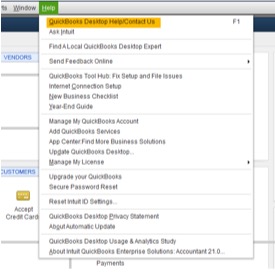
- Enter a question, keyword, or topic you need help with.
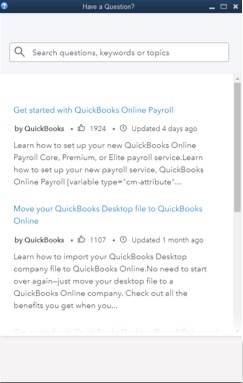
Search for Contact Support, then click on Contact Us to be connected to an expert for help. Note: you need to search for an article before you'll see the Contact Us option.
- QuickBooks Plus and Enterprise Support Hours:
- Plus (Mac, Pro, Premier)
- Monday to Friday, 6 AM to 6 PM
- Enterprise
- Monday to Friday, 5 AM to 7 PM PT, Saturday to Sunday, 6 AM to 3 PM PT
- Plus (Mac, Pro, Premier)
Please let me know if there is anything else I can assist you with today. Have a good one!
- Mark as New
- Bookmark
- Subscribe
- Permalink
- Report Inappropriate Content
Other questions
Thanks Tori,
I went through the help options in QB and had someone call to help me resolve this issue. I'm back up and running.
Suzan

- Mark as New
- Bookmark
- Subscribe
- Permalink
- Report Inappropriate Content
Other questions
If you don't mind my asking, what did they say was the issue to cause the problem and what was the resolution to fix it. Since I started the post in the beginning of the year, there have been so many other customers that related to my problem. But there has not been a direct answer as to why this is happening and what fixes it.

- Mark as New
- Bookmark
- Subscribe
- Permalink
- Report Inappropriate Content
Other questions
I was told it's due to expired Renewal Tokens. You have to call customer support ask to add tokens to your account
- Mark as New
- Bookmark
- Subscribe
- Permalink
- Report Inappropriate Content
Other questions
It's happening because of to expired Renewal Tokens. You have to call customer support and ask to add tokens to your account
- Mark as New
- Bookmark
- Subscribe
- Permalink
- Report Inappropriate Content
Other questions
Apparently they are getting used to the problems and were able to get the problem fixed in a few minutes. We have QB 2024 Plus Annual Subscription Premier. He stated that QB has so many logins assigned to the subscription. Once you reach the assigned login amounts, they have to "load" more on to your QB subscription. I told him I have been using QB for 20 or 30 years and had never had that issue before? He put me on hold for less than 5 minutes and had a supervisor load more on our QB account, I closed QB, reopened it and everything was back to normal. I went in through the Help in QB, then contact us and had them call me.

- Mark as New
- Bookmark
- Subscribe
- Permalink
- Report Inappropriate Content
Other questions
Got this pop-up message, " QB subscription has expired" I just renewed it last June 5,2025 for $1399.00
Can't work on my QB because it goes to view mode only. Can someone look into this?
- Mark as New
- Bookmark
- Subscribe
- Permalink
- Report Inappropriate Content
Other questions
Can you login to CAMPS and find your license code there?
What is your license status? Active or Canceled?

- Mark as New
- Bookmark
- Subscribe
- Permalink
- Report Inappropriate Content
Other questions
I completely understand the inconvenience of being stuck in View Only mode, especially right after completing a renewal, Courage. That's definitely not the experience we want for you, and I'll direct you to our representatives to help you get your account fully accessible again.
Since this involves a subscription payment, I recommend contacting our live experts for guidance on verifying it. They can also review the renewal process you've made and check your account status. Follow the steps below to reach out to them outside the program:
- Go to the QuickBooks Support page.
- Select the product and edition you need help with.
- Enter your question or concerns, then click Continue.
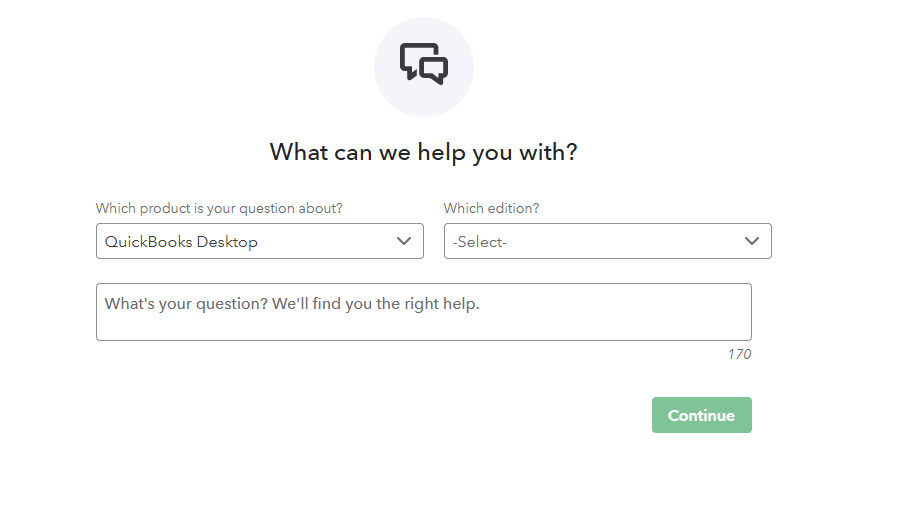
You can manage your QuickBooks Desktop subscriptions and services through the Customer Account Maintenance Portal (CAMPs).
Ping me a reply if you have further questions about your subscription. We're always here to assist you.

- Mark as New
- Bookmark
- Subscribe
- Permalink
- Report Inappropriate Content
Other questions
Same issue here. Was able to resolve with help from tech rep. Here is what worked. Even though my credit card on file was updated and current (and my license renewed and active), for some reason just confirming the CC and then sync'ing the license from within the software solved it. Note that Setps 2 and 3 did not apply to my version of the portal - I simply went to Step 4.
- Sign in to the Customer Account Management Portal (CAMPs) as an admin user.
- Select QuickBooks Desktop from your products and services.
- Select details next to your QuickBooks Product.
- Select Edit next to your Payment Method. Update your payment info. When you’re done, select Save and Close.
Another set of steps the tech shared with me were the following -- these were to check the tokens. However I could not find the License/Token Management section he referred to in the QB software. Perhaps it is for Enterprise of a different version. I am working in QB Desktop Premier Plus Contractor Edition 2024 R15P.
Check Locally on Your Workstation:
- Open the application or software producing the error.
- Look for a License/Token Management section in the software settings or system tray options.
- It may show you:
- Number of tokens remaining.
- Token expiration date.
- Whether your workstation is connected to the license server (if applicable).
- Open QuickBooks Desktop.
- Go to the Help menu and hover over Manage My License. Then select Sync License Data Online.
