Turn on suggestions
Auto-suggest helps you quickly narrow down your search results by suggesting possible matches as you type.
Showing results for
I want to make sure your file conversion is seamless, @Migrating to On-Line Problem.
When you want to covert from QuickBooks Desktop to QuickBooks Online, you need to have the desktop updated to the latest release. Before anything else, may I know what version of QuickBooks do you have? You may check the current release from the following:
If your current company file is not updates, you can manually install the update patch outside QuickBooks and see if it makes a difference. See these steps:


After updating file, you can follow these steps to start the conversion process:
I've included some related links to aid you with the conversion process:
If you're still unable to convert, I highly recommend contacting our Support Team for assistance. They can help you transfer your file successfully. Here's how to contact our Technical Support:
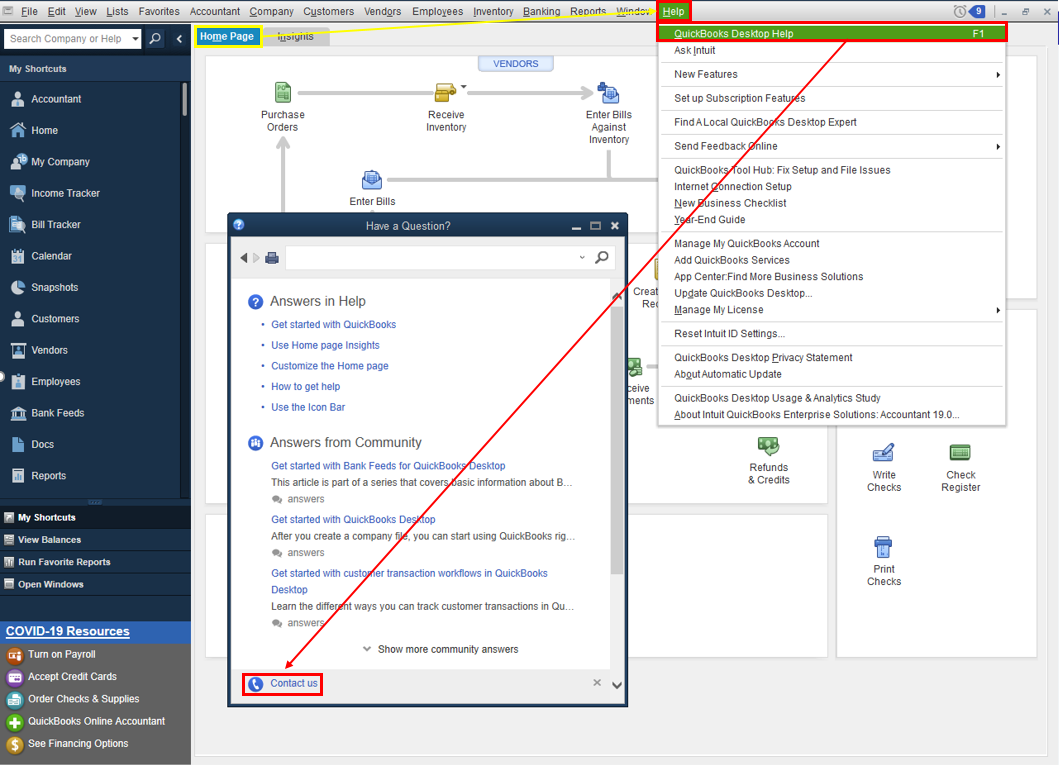
Refer to this article to learn more about our contact options and support availability: Contact QuickBooks Desktop support
I want to ensure everything is resolved for you. Post here again with the result as I want to know that this has been taken care of. I'm also here to provide further assistance if you need further help.

