

- Mark as New
- Bookmark
- Subscribe
- Permalink
- Report Inappropriate Content
Other Questions
I want to make sure your file conversion is seamless, @Migrating to On-Line Problem.
When you want to covert from QuickBooks Desktop to QuickBooks Online, you need to have the desktop updated to the latest release. Before anything else, may I know what version of QuickBooks do you have? You may check the current release from the following:
- Release notes for QuickBooks Desktop 2020
- Release notes for QuickBooks Desktop 2021
- Release notes for QuickBooks Desktop 2022
If your current company file is not updates, you can manually install the update patch outside QuickBooks and see if it makes a difference. See these steps:
- Go to the Downloads & Updates page.
- Choose US for the country.
- Below the survey, click on the standard setup link.

- On the next page, enter your QuickBooks version to update then press Search.

- To download the patch, click the link for Get the latest updates.
- At the bottom once the patch is downloaded completely, wait until it launches automatically. You can also double-click on it to apply the update. See this sample screenshot:

After updating file, you can follow these steps to start the conversion process:
- Make sure to sign in as an admin to the desktop company file you want to move.
- Press Ctrl + 1 to open the Product Information window.
- On your keyboard, press Ctrl + B + Q, then select OK to display the export window.
- On the export window, select Get started.
- Sign in as an admin to your QuickBooks Online company.
- Use Choose online company, then select the QuickBooks Online company you want to replace with your company file.
- Click Continue.
- If you track inventory in QuickBooks Desktop:
- Select Yes to bring them over, then specify the as of date.
- Select No if you want to set up new items later in QuickBooks Online.
- Add the keyword “Agree” in the text field, then select Replace.
- Select Yes, go ahead and replace the data, then select Replace.
I've included some related links to aid you with the conversion process:
- Migrating from QuickBooks Desktop to QuickBooks Online
- Move your QuickBooks Desktop file to QuickBooks Online
- Move from QuickBooks Desktop to Online
If you're still unable to convert, I highly recommend contacting our Support Team for assistance. They can help you transfer your file successfully. Here's how to contact our Technical Support:
- Open QuickBooks and click the Help menu.
- Select QuickBooks Desktop Help.
- On the pop-up screen select Contact us.
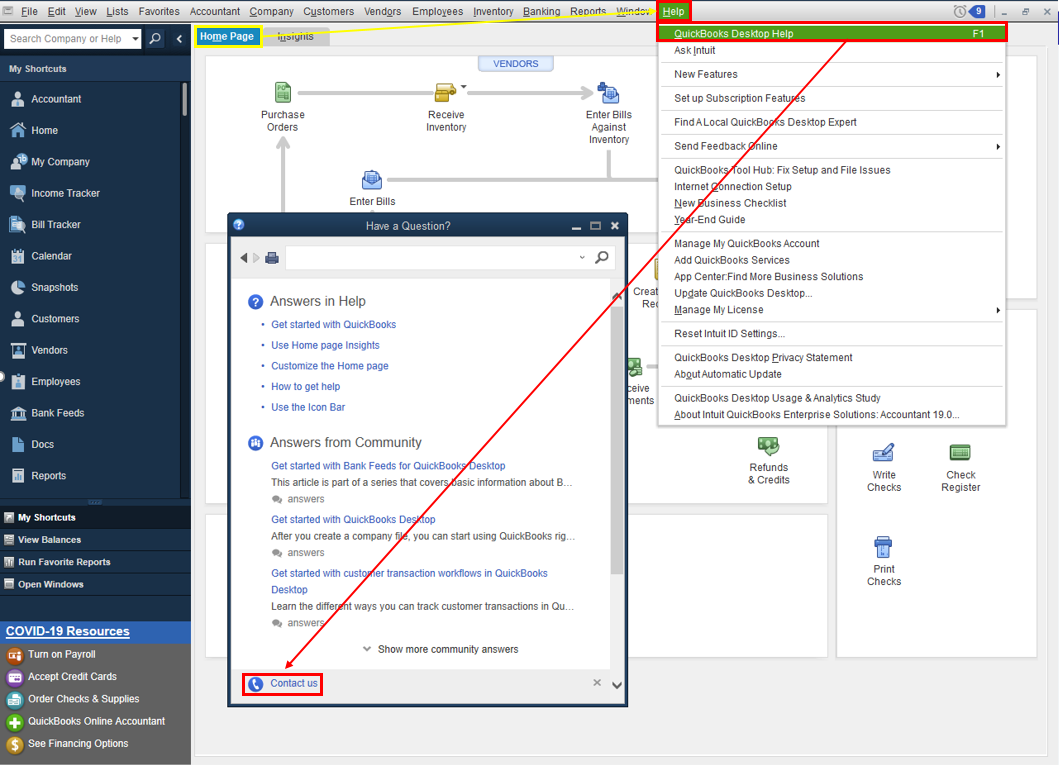
- Click the Search for Something else button then type your concern in the Ask us anything box.
- Hit Search then scroll down to get your contact options.
Refer to this article to learn more about our contact options and support availability: Contact QuickBooks Desktop support
I want to ensure everything is resolved for you. Post here again with the result as I want to know that this has been taken care of. I'm also here to provide further assistance if you need further help.
