Turn on suggestions
Auto-suggest helps you quickly narrow down your search results by suggesting possible matches as you type.
Showing results for
Hello there, @ShevFamilyFdn. Welcome to the Community.
I understand how inconvenient it can be when QuickBooks Desktop (QBDT) suddenly isn't recognizing your printer, especially since you've already tried several steps to get it working. Let's go through some troubleshooting together to get this resolved.
Step 1: Run the QuickBooks Tool Hub.
The Tool Hub helps fix common errors. For the best experience, we recommend you use Tool Hub on Windows 10, 64-bit.
Here's how:
Step 2: Use the Print and PDF Repair tool
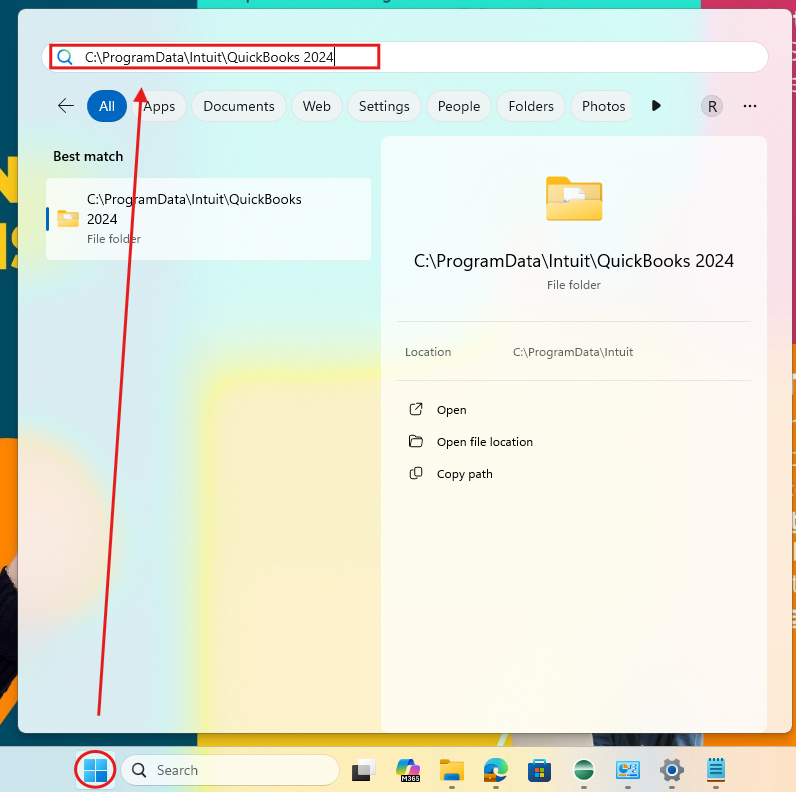
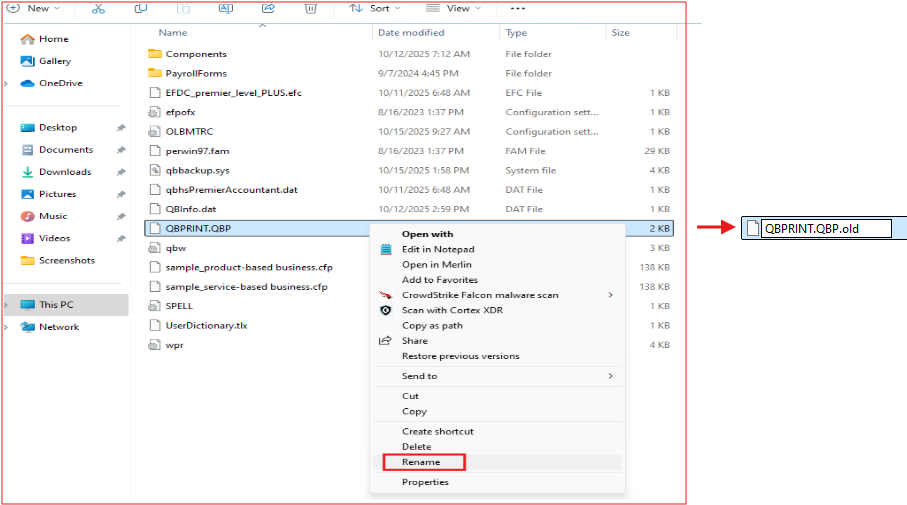
If issue still persist, you can rename the QBPrint.QBP file. QBDT keeps a small file that remembers your printer settings. If that file gets damaged, QuickBooks may not recognize your printer. Renaming it tells QuickBooks to create a new, clean version, which clean the issue right away.
Here's how:
If you have any follow-up questions, please don't hesitate to click the Reply button.

