
- Mark as New
- Bookmark
- Subscribe
- Permalink
- Report Inappropriate Content
My client has QB Online Plus and there is no option to set up automatic late fees on customer invoices. However, when I go back to the Accountant page, I can set it up?
Everything I've read online says I should be able to set it up for my client, but there is no Late Fee option in the Settings.

- Mark as New
- Bookmark
- Subscribe
- Permalink
- Report Inappropriate Content
Sales & Customers
Hi klderksen,
I can see how this situation can raise questions, especially with the differences between the Accountant page and the client’s settings. Let me share an alternative method for turning on Late Fees without accessing the Account and settings page. Here’s how you can do it:
- Close your client's Account and settings (Settings) page to return to the Dashboard (Home) page.
- Click the + Create button in the upper-left corner and select Invoice.
- Select Manage to open the invoice settings drawer, then go to Payment options.
- Enable Late fees and click Manage.

- Set up the Late Fees Settings and hit Save.
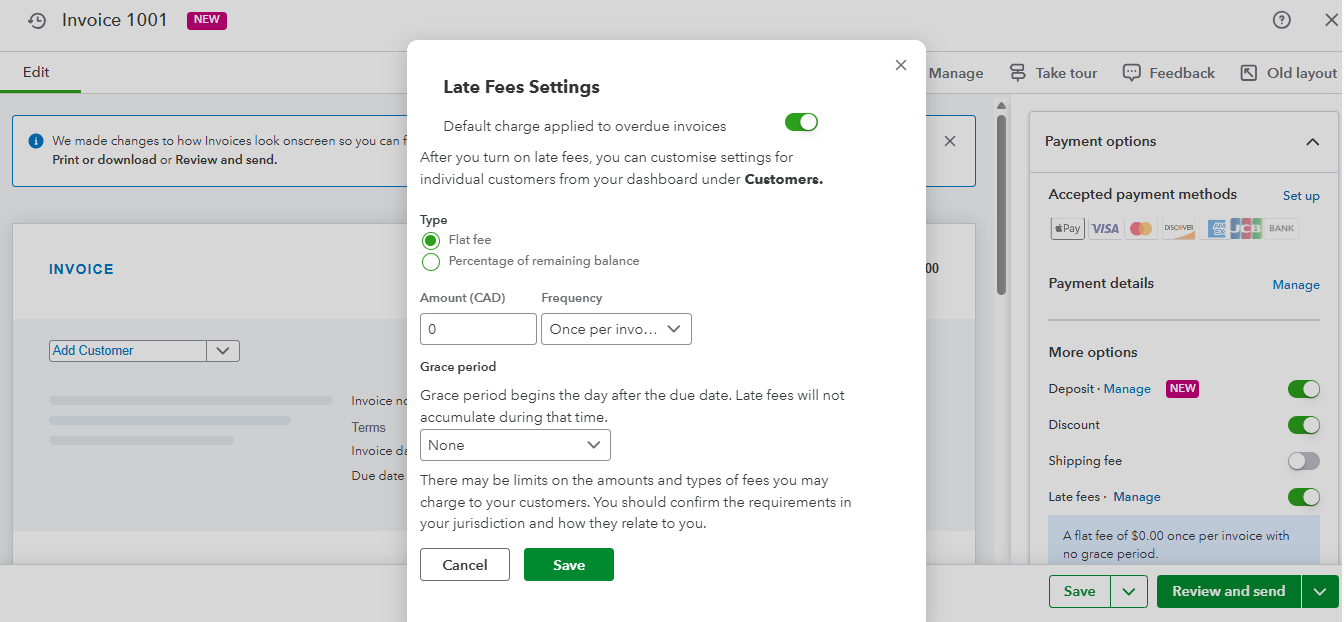
You can check out this link for reference: Turn on automatic late fees.
Please feel free to reach out if you have any further questions or concerns. We’re always here to help.
- Mark as New
- Bookmark
- Subscribe
- Permalink
- Report Inappropriate Content
Sales & Customers
Thank you James, however I'm not seeing these items on my clients page? I do see it on my main page, and can follow your steps.


- Mark as New
- Bookmark
- Subscribe
- Permalink
- Report Inappropriate Content
Sales & Customers
Hi there, klderksen.
We can switch your invoice layout from the classic view to the new interface. This will allow us to confirm if you can see the option to set up automatic late fees.
Here's how to do it:
- Go to the Sales and Get Paid menu.
- Select Invoices.
- Choose an invoice from the list.
- Click on Update layout in the top right corner.


After updating to the new layout, you should be able to see the Late Fees option in the top right corner under More Options.
If the issue persists, I recommend contacting our live support team for further assistance.
Here's how you can reach support:
- Go to the Help icon in the top menu.
- Select the Search tab and enter your concern. For instance, type help.
- Click the Contact Us button and choose between Chat or Callback to connect with us.
Phone support is available on weekdays from 8:00 AM to 7:00 PM. You can request a callback during weekdays from 8:00 AM to 6:00 PM, and a support expert will contact you as soon as possible. Chat support is available weekdays from 8:00 AM to 10:00 PM and weekends from 8:00 AM to 6:00 PM.
Please feel free to comment here again if you need any further assistance with QuickBooks.
