Turn on suggestions
Auto-suggest helps you quickly narrow down your search results by suggesting possible matches as you type.
Showing results for
Everything I've read online says I should be able to set it up for my client, but there is no Late Fee option in the Settings.

Hi klderksen,
I can see how this situation can raise questions, especially with the differences between the Accountant page and the client’s settings. Let me share an alternative method for turning on Late Fees without accessing the Account and settings page. Here’s how you can do it:

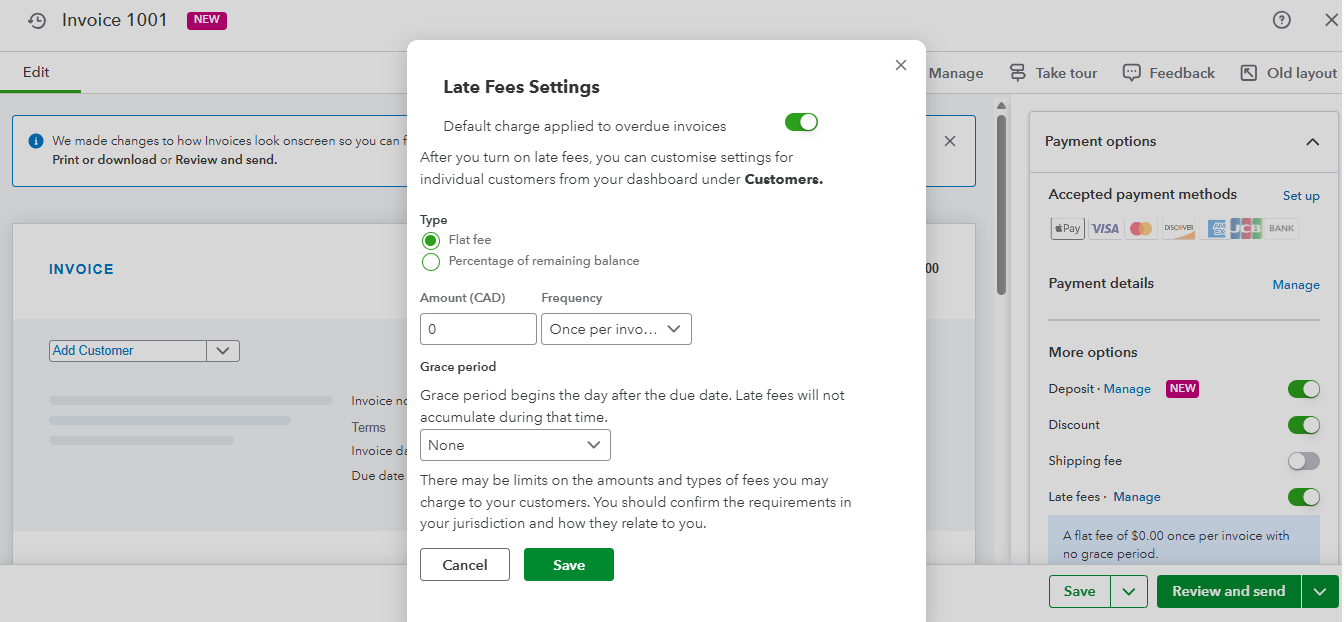
You can check out this link for reference: Turn on automatic late fees.
Please feel free to reach out if you have any further questions or concerns. We’re always here to help.
Thank you James, however I'm not seeing these items on my clients page? I do see it on my main page, and can follow your steps.
Hi there, klderksen.
We can switch your invoice layout from the classic view to the new interface. This will allow us to confirm if you can see the option to set up automatic late fees.
Here's how to do it:
After updating to the new layout, you should be able to see the Late Fees option in the top right corner under More Options.
If the issue persists, I recommend contacting our live support team for further assistance.
Here's how you can reach support:
Phone support is available on weekdays from 8:00 AM to 7:00 PM. You can request a callback during weekdays from 8:00 AM to 6:00 PM, and a support expert will contact you as soon as possible. Chat support is available weekdays from 8:00 AM to 10:00 PM and weekends from 8:00 AM to 6:00 PM.
Please feel free to comment here again if you need any further assistance with QuickBooks.


You have clicked a link to a site outside of the QuickBooks or ProFile Communities. By clicking "Continue", you will leave the community and be taken to that site instead.
For more information visit our Security Center or to report suspicious websites you can contact us here


