

- Mark as New
- Bookmark
- Subscribe
- Permalink
- Report Inappropriate Content
Manage Your Account
Welcome to the Community, @Selene-ANN.
If you have entered your client data in QuickBooks Online Accountant (QBOA), you can transfer it to your client's QBO by exporting it from QBOA and then importing it into the client's QBO. Here's how:
- Sign in to your QBOA account.
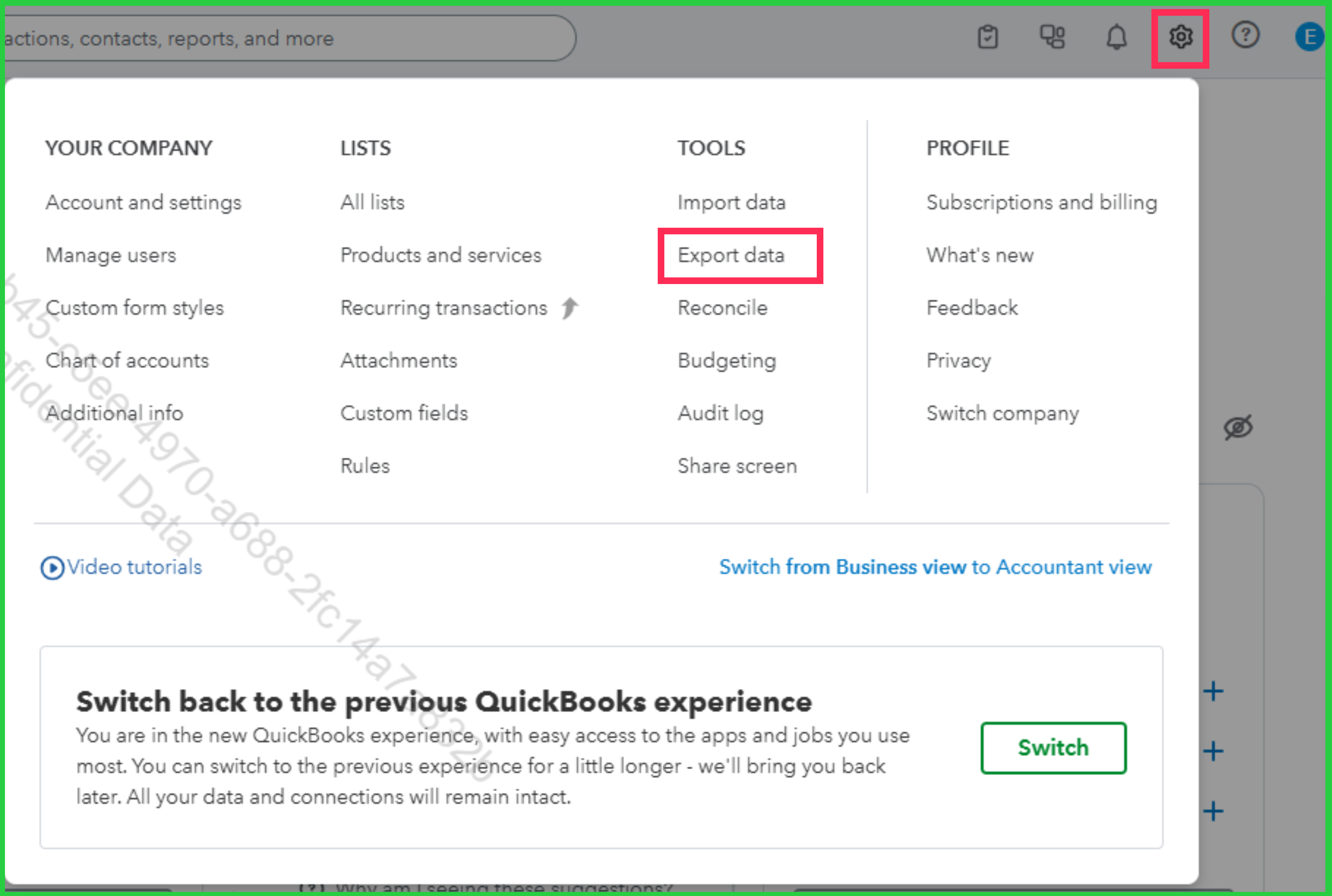
- Go to the Gear icon, then select Export data.
- Choose the data you want to export, then select Export to Excel.
Once exported, sign in to your client's QBO and import the file by going to the Gear icon and selecting Import data.
If you entered your client's data into the wrong company, you can move it to the correct company using the same approach: export it from the incorrect company and import it into the correct client's QBO. Here's how:
- Go to the Gear icon, then select Export data.
- Select the correct reason for why you're exporting.
- Choose the data to export, and select Export to Excel.
- Once exported, sign in to the correct client's QBO and import the file by going to the Gear icon and selecting Import data.
For FAQs about importing data to QBO, check out this article: Common questions about importing data to QuickBooks Online.
If you have other concerns, don't hesitate to drop a comment in thread.
