
Turn on suggestions
Auto-suggest helps you quickly narrow down your search results by suggesting possible matches as you type.
Showing results for
HI, my hard drive crashed and I want to move my quickbooks file to the online platform. I downloaded the trial version and imported my datafile. I couldnt see the export to quickbooks online button under company tab so I updated as it says I should do on quickbooks online. However, now I have updated it says my trial is over and I cannot access it to be able to export. I only installed it 20 mins ago!!
Any solutions please? Thank you
Thanks for posting in the Community,
When transferring your file from QuickBooks Desktop to Quickbooks Online, you'll need to make sure that the two platforms are in the same region/version. This way, the data will be transmitted successfully.
Since you're unable to access your trial card to complete the process, I highly suggest contacting our Phone Support team. They have tools such as screen-sharing (remote access) that can pull up your account in a secure environment and check the root cause of this issue.
Here's how to reach them:
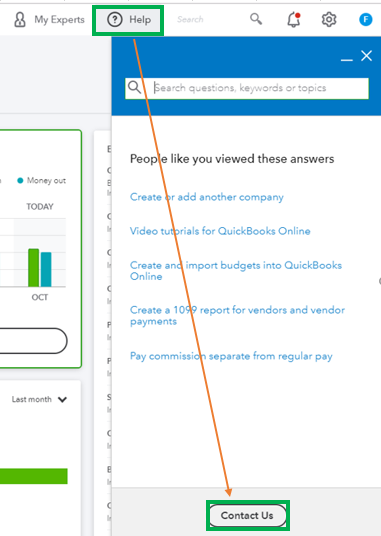
I've also attached an article you can view about the FAQs in importing data conversion to QBO: Import Data Conversion to QuickBooks Online - Frequently Asked Questions.
Please let me know how it goes or if you have any other questions. I'm always here to help. Have a good one!
You have clicked a link to a site outside of the QuickBooks or ProFile Communities. By clicking "Continue", you will leave the community and be taken to that site instead.
For more information visit our Security Center or to report suspicious websites you can contact us here


