Turn on suggestions
Auto-suggest helps you quickly narrow down your search results by suggesting possible matches as you type.
Showing results for
CYBER MONDAY SALE 70% OFF QuickBooks for 3 months* Ends 12/5
Buy nowThank you for joining the thread, TheAmerican. Currently, QuickBooks has yet to update the feature to correct the recipient's name or TIN. Let me direct you to the appropriate support.
If you have tried the troubleshooting steps provided above by my colleagues and the issue persists, I recommend contacting our live support team. They can arrange a screen-sharing session to help identify the reason behind the error, 'Correcting the recipient name or TIN is currently unavailable.' Additionally, they can open a ticket to further investigate this issue.
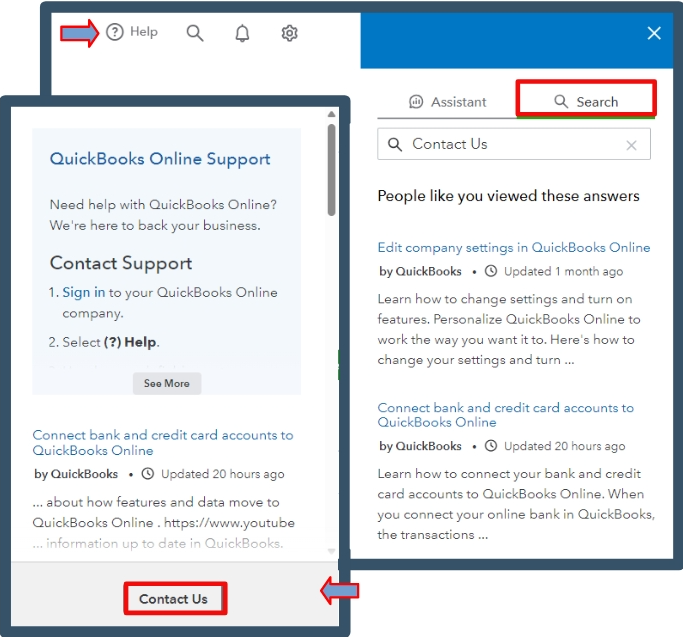
Here's how to contact our live support team:
Also, correcting or changing your 1099s in QuickBooks helps maintain accurate financial records, ensure tax compliance, prevent issues for businesses and recipients, and prepare for year-end reporting and audits.
Moreover, printing your 1099 forms helps maintain compliance, ensures the accuracy of reported information, and provides tangible records for your business and tax purposes.
Correcting the recipient's name or TIN in QuickBooks is crucial for compliance, accuracy, and avoiding tax issues, which ultimately improves your overall business operations. For further assistance with managing your 1099s, click the reply button. I'm always here to help.

