Turn on suggestions
Auto-suggest helps you quickly narrow down your search results by suggesting possible matches as you type.
Showing results for
Hello Justine, thank you for reaching out regarding your concern about the customer list not displaying all of your customers. I understand how important it is to have complete and accurate access to your customer information. Allow me to explain the possible reasons behind this issue and provide you with a step-by-step guide to help resolve it effectively.
When customers are marked as inactive in QBO, they won’t show up on the list by default. However, they will still appear in created transactions like estimates and invoices for documentation.
Here's how to check if some of your clients are deactivated and make them visible:
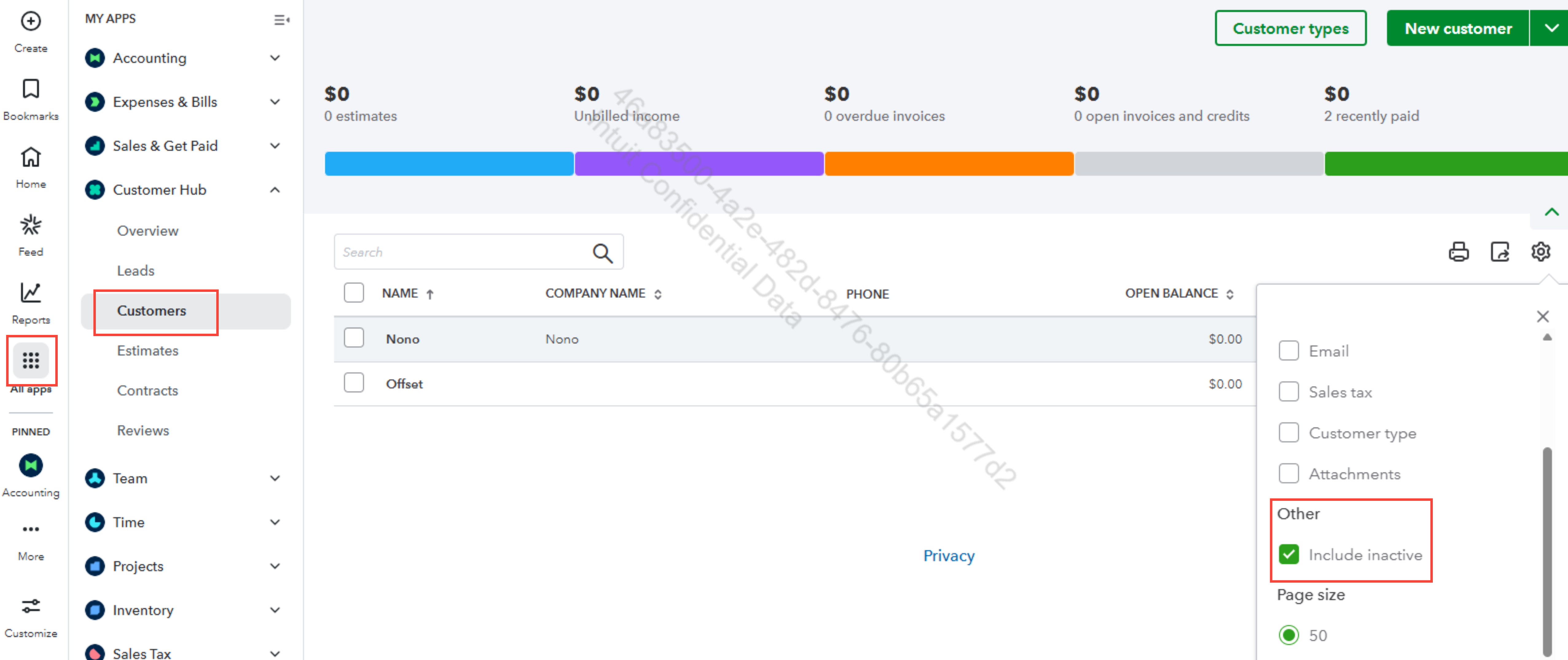
To find their name quickly, you can also use the search bar at the top. However, if your customers are still not showing, we can perform some troubleshooting steps. As cached files can sometimes interfere with QBO performance. I recommend opening your QBO in an incognito or private browser window. Alternatively, you can use other supported up-to-date browsers.
Should you have any further questions or need clarification about the customer list or related features, please don’t hesitate to share your inquiries or concerns in the comments below. We’re here to provide the support and detailed information you need to ensure everything works smoothly. Your satisfaction is important to us, and we’ll assist you every step of the way.

