Turn on suggestions
Auto-suggest helps you quickly narrow down your search results by suggesting possible matches as you type.
Showing results for
SALE EXTENDED 70% OFF QuickBooks for 3 months* Ends 12/8
Buy nowWelcome to the Community, @sergei.
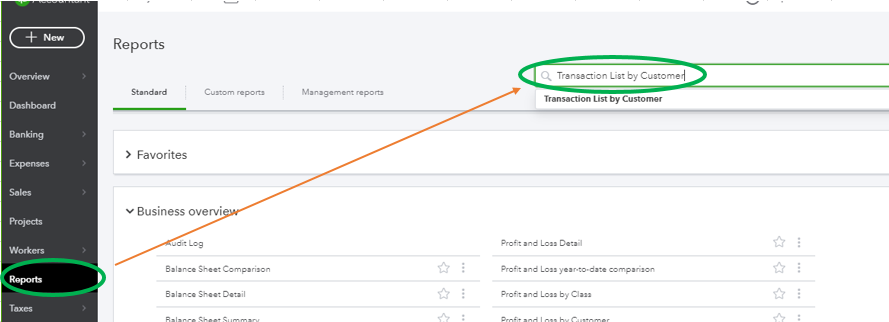
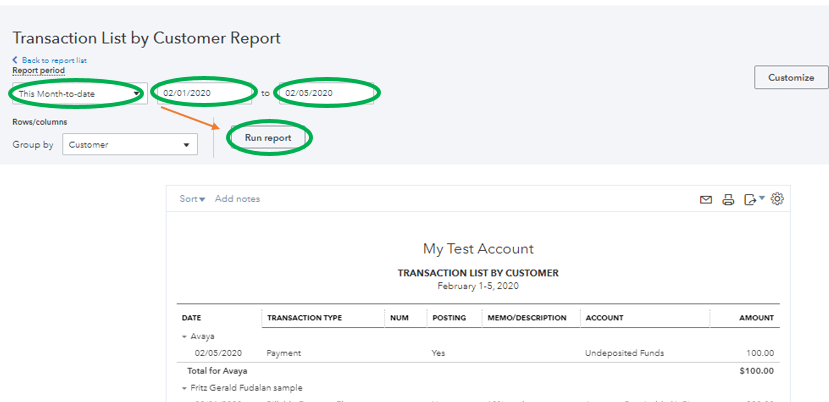
In QuickBooks Online (QBO), there isn't a direct way to see which customers haven't ordered in a while. However, you can run the Transaction List by Customer report. This will give you the list of invoices, sales receipts, and other customer-related transactions. You can use this as a reference to determine when was the last time they ordered.
Here's how to pull it up:
Just in case, I'll add these articles for future reference:
I'll pass along your suggestion to our Product Developers. They're always looking for ideas to consider on how to improve QBO. In the meantime, I recommend visiting our Blog site. This is where we share recent happenings and future developments, such as updates to newly added features.
Reach out to me in the comment section if you have any other issues or concerns, and I'll get back to you right away. I'm always here to help. Have a good one!

