Get 50% OFF QuickBooks for 3 months*

Buy now
cancel
Showing results for 
Search instead for 
Did you mean: 
Announcements
Simplify payday and set payroll to run automatically on QuickBooks. Explore QuickBooks Payroll

Reply to message

View discussion in a popup

Replying to:
Michael K
Moderator

Reply to message

Hey there, @NLMadmin. Glad to have you here in the Community. I'm happy to help you with creating a receipt for your donors.


It's just a few simple clicks. Here's how:
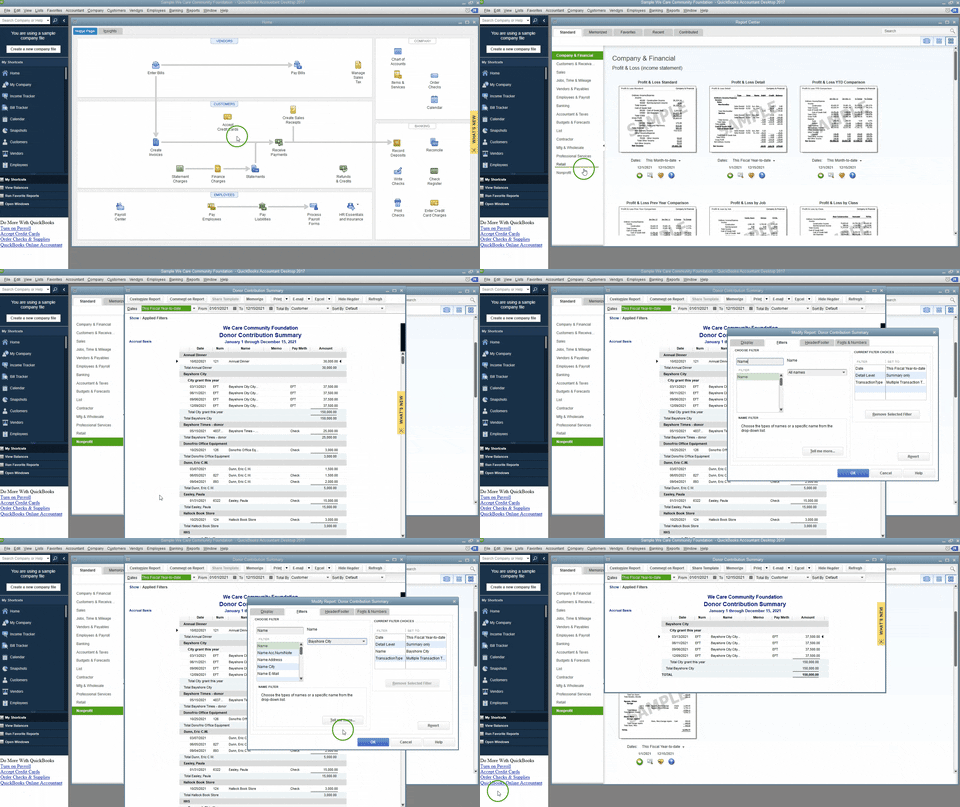
  1. In the menu bar, choose Reports, then Report Center.
  2. Click the Nonprofit tab to the left, then scroll down and hit Run below the Donor Contribution Summary report.
  3. Once the report has been populated, select the Customize Report button at the top.
  4. Choose the Filters tab, then use the Search Filters box to type in "Name". Next to the filters, you can choose which donor you'd like to filter.


I'm only a click away should you have any further questions. Wishing you and your business continued success in all that you do.

Need to get in touch?

Contact us