Turn on suggestions
Auto-suggest helps you quickly narrow down your search results by suggesting possible matches as you type.
Showing results for
Get 50% OFF QuickBooks for 3 months*
Buy nowGranting access for budgeting and forecasting tasks while safeguarding sensitive financial information, like payroll, can be risky, Dampf. However, by utilizing custom the Area and Activities column, you can strike the perfect balance enabling your sales team to work effectively without putting payroll security at risk.
Yes, you're right that full access permissions are required for the Budget and Forecasting function to operate effectively. However, for the Company and Reports Area and Activities sections, it is recommended to set access to "None." These areas provide users unrestricted access to view all transactions, including sensitive payroll information, which may not be relevant to their responsibilities. Limiting access helps protect confidential data and ensures appropriate usage.
Here's how you can edit it:
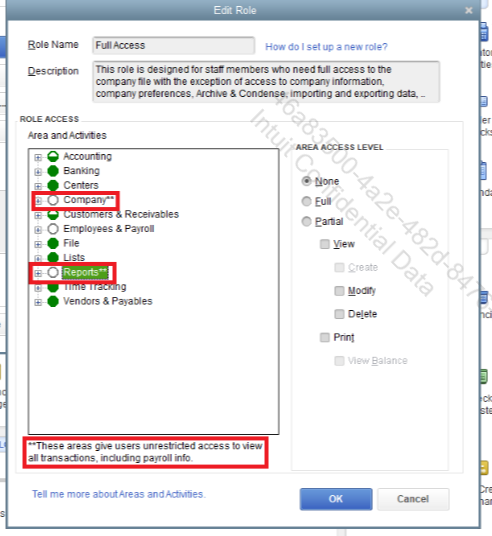
By configuring QuickBooks Enterprise permissions thoughtfully, you can empower your sales team to handle budgeting and forecasting tasks while safeguarding payroll and other sensitive company data. Regularly reviewing permissions and monitoring activity helps ensure security remains intact while your team has access to the tools they need to succeed. If you need any additional support, please don’t hesitate to reach out.

