Turn on suggestions
Auto-suggest helps you quickly narrow down your search results by suggesting possible matches as you type.
Showing results for
Get 50% OFF QuickBooks for 3 months*
Buy nowThanks for checking in with us, mleblanc.
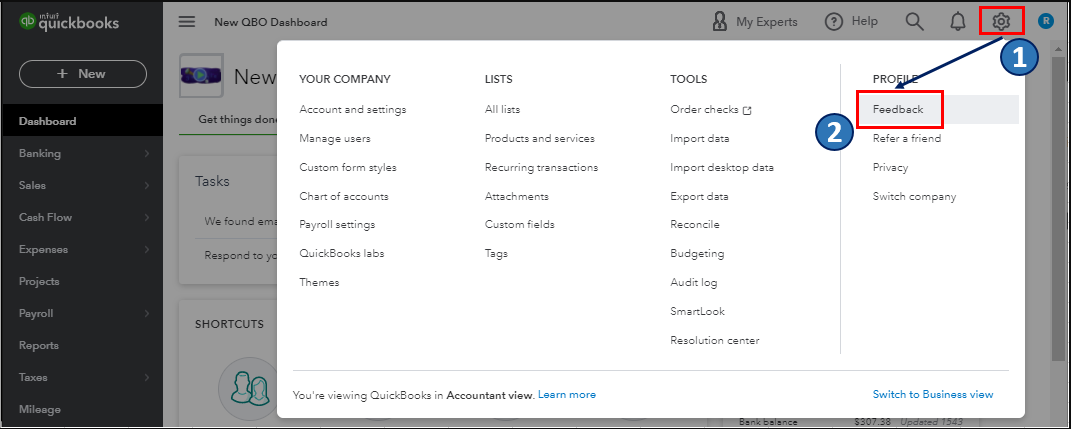
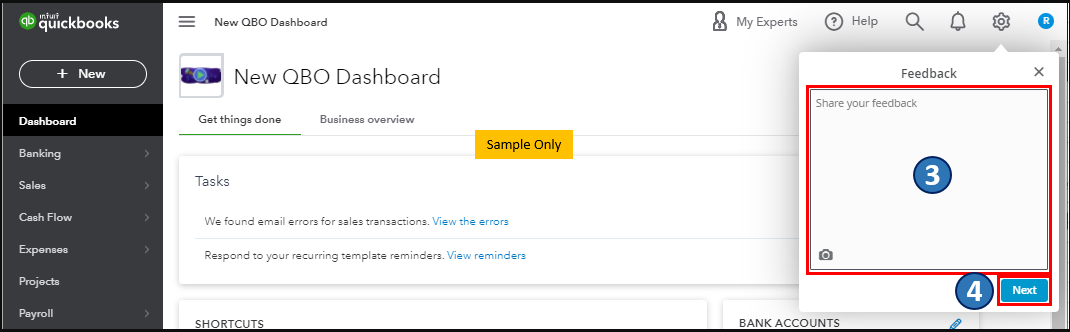
In QuickBooks Online, the option to remove a page number from an invoice is not available. We consider customer feedback as an opportunity to improve the various features of our products. I'd recommend sending feedback to our engineers directly. They may investigate this suggestion and consider including it in future updates. Let me show you how:
I've attached screenshots below for your reference:
On top of that, you can visit his page to keep updated with the latest software improvements and enhancements with QBO: Customer Feedback for QuickBooks Online.
Also, to further guide you in managing your account and the growth of your business using QBO, I'd recommend checking out one of our support websites: QuickBooks Help Articles. It includes topics about account management, banking, and expenses, to name a few.
Please get back if you have other QuickBooks record-keeping concerns. I'm still here to help. Take care always, and more power to your institution.

