Turn on suggestions
Auto-suggest helps you quickly narrow down your search results by suggesting possible matches as you type.
Showing results for
CYBER MONDAY SALE 70% OFF QuickBooks for 3 months* Ends 12/5
Buy nowThanks for coming back here, @sms2friends.
I can share some more insights on how you can get the report you wanted.
For this, you can use a Sales by Item Detail report. It will show you the list of items sold for each customer. As an overview, this report will group the customers under a certain item.
To do that, follow the steps below:


See these links to learn more about modifying and memorizing QuickBooks Desktop reports:
If you need a higher level of customizations, note that our developers are working internally when it comes to projects and product enhancements. They go through a wide range of feedback, and tries to navigate a path forward with accessibility leading.
Their goal is to be purposeful and thorough with the enhancements and product updates to make our program efficient to use. For now, we can't provide the turnaround time if they will release additional report preferences. They work on product enhancements internally.
If you have any product suggestions to our developers about our report preferences, go to the Help menu and select Send Feedback Online.
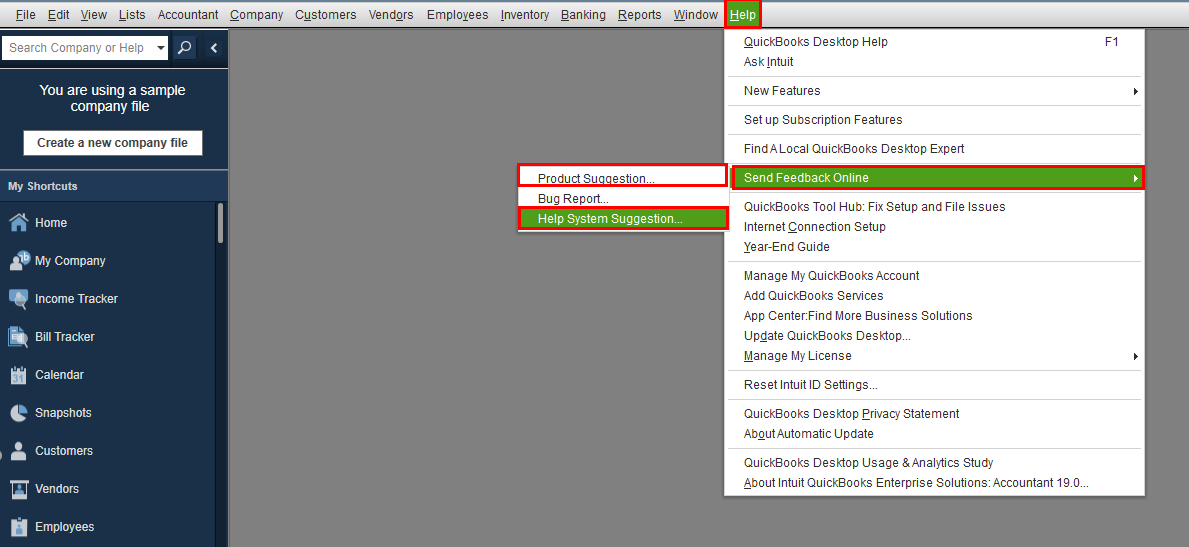
You can also check out this link to be updated with the recent and upcoming changes for our QuickBooks products: QuickBooks Product Updates (QuickBooks Desktop and Online)
If you have any questions or need further help with QuickBooks, feel free to visit us anytime. You can also mention my name on your posts and I'll be more than happy to help. Have a nice day!

