Turn on suggestions
Auto-suggest helps you quickly narrow down your search results by suggesting possible matches as you type.
Showing results for
CYBER MONDAY SALE 70% OFF QuickBooks for 3 months* Ends 12/5
Buy nowI appreciate the steps that you've taken and the update that you gave, @jtmpv.
I've got another suggestion that you can try that can help identify why the customer is missing from the customer list.
You can utilize the Audit Log feature in the system to see if there are any modifications made to the customer's information. This area keeps track of your activities, and you can see who made changes to your books and what they did.
Know that in doing this you need to sign in as an admin to access the audit log. Ask your master admin if you don’t see it.
Here's how you can navigate it:


To learn more on how to use this feature, please see this link: Learn what the audit log can do and how to use it to keep an audit trail.
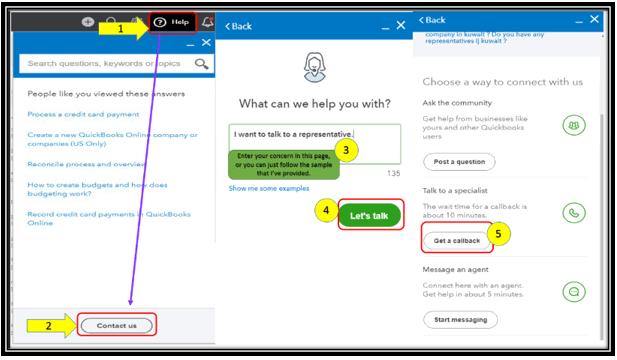
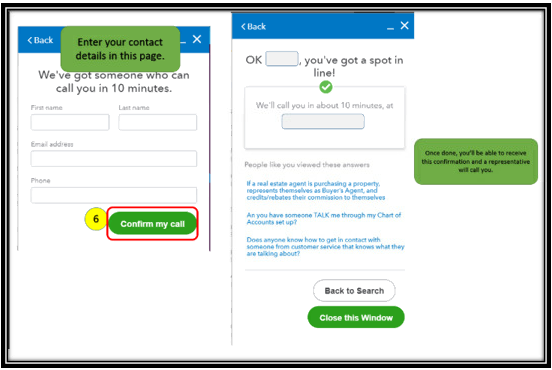
If there are no changes made, and the problem continues, I recommend reaching out to our Customer Care Team. They have the tools that can further isolate this hurdle and provide a fix.
Here's how you can reach them:
Keep me posted on how it goes by leaving a reply below. I'm always here to help if you need anything else. Stay safe!