Turn on suggestions
Auto-suggest helps you quickly narrow down your search results by suggesting possible matches as you type.
Showing results for
Get 50% OFF QuickBooks for 3 months*
Buy nowI spend $1,000+ to upgrade to Enterprise specifically for the asset manager; it is broken - will not let you post to QB. I have spent over 25 hours with support. NO ONE WILL GET ADVANCED SUPPORT TO WEIGH IN. Here's what I see - I think it is likely that others are having similar issues because FAM is BROKEN:
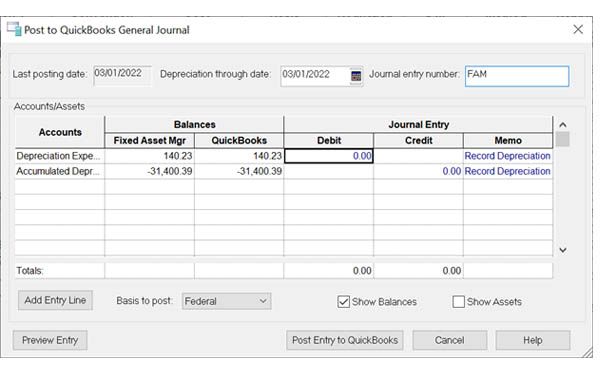
Here's what the post to QB General Journal Box is supposed to look like and does after a fresh install of the program (Works correct when first installed). Notice the date box in the depreciation through date [see image]:
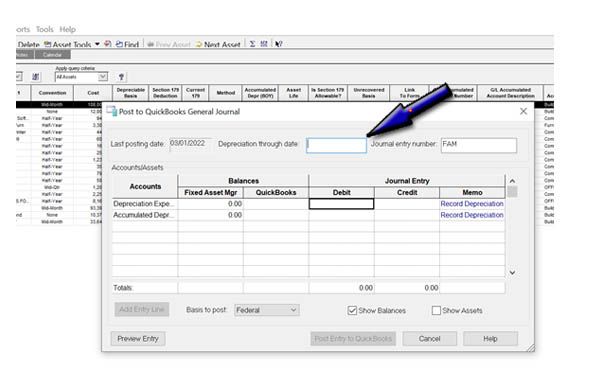
After uninstalling and reinstalling QB Enterprise V22 - we eventually discovered that the Posting box was getting corrupted after running updates on the program from the Help - Update QuickBooks. After it runs update (that update includes one in the FAM) then the posting box loses the date that is supposed to be there and as a result all the posting information is either missing or not accurate - now FAM is corrupted and no longer works correctly. Here's what it looks like after running the update:
Running the tool hub fixes do NOT fix this; repairing the program from the repair option will fix it for only one post - then it breaks again. There is obviously some type of FAM corruption. All six tier agents I've talked with are beginning to have customers that are having similar issues.