Turn on suggestions
Auto-suggest helps you quickly narrow down your search results by suggesting possible matches as you type.
Showing results for
CYBER MONDAY SALE 70% OFF QuickBooks for 3 months* Ends 12/5
Buy nowThanks for joining the thread and posting an update here, Jane.
I reviewed our ongoing investigations and haven't found any ongoing issues for First Republic Bank. Error 176 falls into the category of a general script error. We would ask you to reach out to your online support team who will be troubleshooting the issue.
Here's how to contact us:

If the transactions are not coming in and you're in rush to get bank transactions in your account for reconciliation, upload them manually. Download the data from your bank then map the transactions in a CSV file.
Once it is ready, start importing the file to your QuickBooks Online company. Follow these steps:

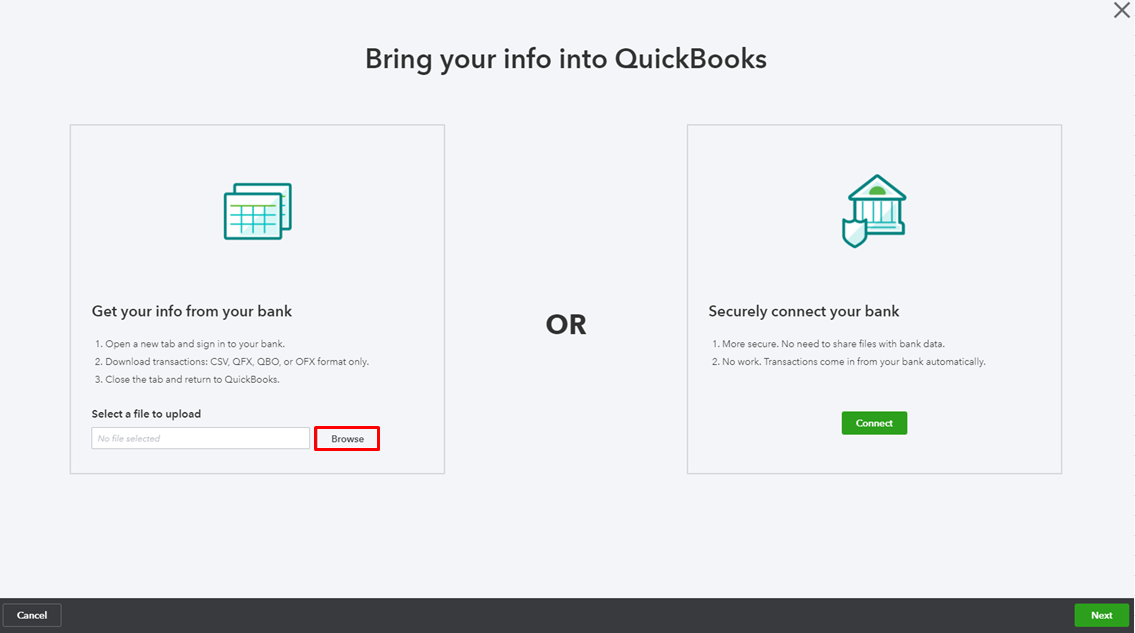
When the online banking connection is reconnected, the bank might re-download the transactions that were not fetched before. To avoid any duplicates, exclude them in the For Review tab. Here's how:

Excluded transactions are then moved to the Excluded tab, and won’t be added to QuickBooks or be downloaded again. To permanently delete duplicate entries, put a check mark on them, then hit Delete.

To learn more about mapping and uploading bank entries, see the following article:
This thread is always open for additional questions and updates. If you need further assistance with QuickBooks banking, please tag me anytime. I'm always right here to help.

