Turn on suggestions
Auto-suggest helps you quickly narrow down your search results by suggesting possible matches as you type.
Showing results for
Get 50% OFF QuickBooks for 3 months*
Buy nowHello, scottrussell.
I can help you convert your QuickBooks Desktop file into QuickBooks Online. Let's get started.
Before you convert your QuickBooks Desktop to an online version, there are certain limitations you need to know and feature differences between the two.
Here's an article that you can check to know what data can be moved into QuickBooks Online: What to expect when you switch from QuickBooks Desktop to QuickBooks Online.
Once you're done checking, let's try to convert your file again. Be sure to right-click the QuickBooks icon, Run as Administrator, and log in as Admin. After that, updating the QuickBooks Desktop release version is a good start when it comes to fixing program-related issues.
Here's how:
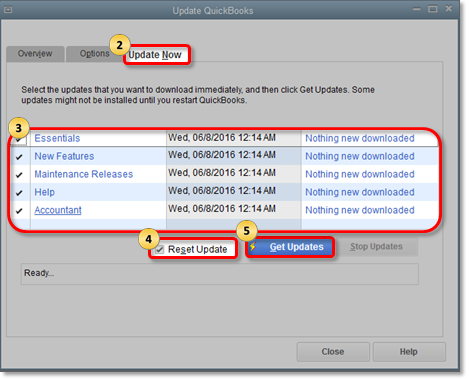
If you're still the same issue, you can follow the steps in this article to repair your QuickBooks: Repair your QuickBooks Desktop for Windows.
You can take a look at these pointers to know more about the converting process:
Move your QuickBooks Desktop file to QuickBooks Online
FAQs about converting from QuickBooks Desktop to QuickBooks Online
Let me know how the result of this troubleshooting in the comment below. I need to make sure this is resolved and you're able to convert your file. Have a good one.

