Get 50% OFF QuickBooks for 3 months*

Buy now
cancel
Showing results for 
Search instead for 
Did you mean: 
Announcements
Simplify payday and set payroll to run automatically on QuickBooks. Explore QuickBooks Payroll

Reply to message

View discussion in a popup

Replying to:
ArielI
QuickBooks Team

Reply to message

Hello, @Shelby W.


QuickBooks Online doesn't allow printing a check when the payment is recorded as an Expense transaction. You can create a physical check outside QBO, or record the payment as a Check transaction so you can print it from QBO. Here's how:

 

  1. Navigate to +Create, then choose Check.
  2. Choose the appropriate customer in the Payee field and the bank the money is being refunded in the Payment account field.
  3. In the Category field, select Accounts Receivable (Debtors) and enter the amount.
  4. Select the appropriate tax in the Tax field and click Save.
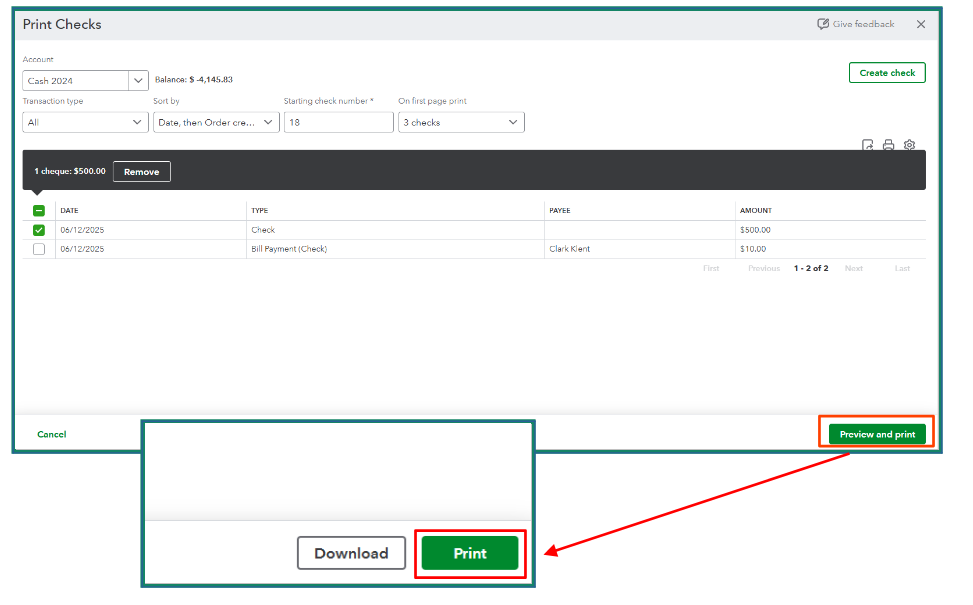
  5. Go to Print Checks, select the check you want to print, click Preview and print, then click Print.


Let us know if you have further questions, and we'll be right here to help you anytime.

Need to get in touch?

Contact us