Turn on suggestions
Auto-suggest helps you quickly narrow down your search results by suggesting possible matches as you type.
Showing results for
CYBER MONDAY SALE 70% OFF QuickBooks for 3 months* Ends 12/5
Buy nowHey there, @gerdgoebel.
How are you doing today? I hope all is well.
In QuickBooks Online Plus and Advanced, you can only do simple tracking and managing of inventory. This includes tracking what's on hand, getting alerts when it’s time to restock, and see insights on what you buy and sell.
If you wish to see how it works in the Online version, you need first to turn on these settings so you can add your inventory.
Please do the following steps in the test account:
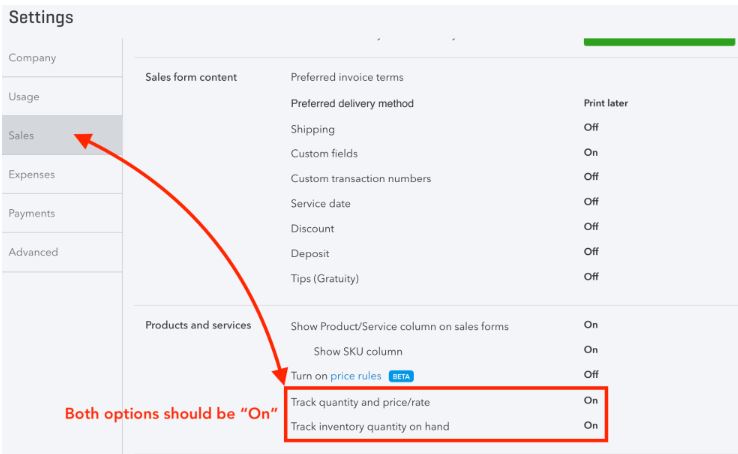
Once done, you can start adding your inventory products. You can check out this article for more info: Set up and track your inventory in QuickBooks Online.
Here's a more in depth help guide that shows more information about moving your inventory from Desktop to Online: Set up inventory after converting from QuickBooks Desktop to QuickBooks Online.
I also wanted to mention you're correct with your thinking about the backup and restore option. QuickBooks Online backup and restore is an exclusive feature of the QuickBooks Online Advanced plan. If you'd like to see more information about this feature, check out Backup and restore your QuickBooks Online Company.
I want to ensure you can review as many details as possible about using inventory in QuickBooks Online. With that said, here is a list of several help articles we have available that covers each aspect of inventory:
If you have any additional questions or concerns, please don't hesitate to let me know. I'm happy to help. Take care!

