Turn on suggestions
Auto-suggest helps you quickly narrow down your search results by suggesting possible matches as you type.
Showing results for
CYBER MONDAY SALE 70% OFF QuickBooks for 3 months* Ends 12/5
Buy nowHello @Brian246,
Thank you for posting here in the Community space about the issue when changing to single-user mode. I know how this unusual behavior affects your productivity so let me help you fix the problem in QuickBooks Desktop.
Since you can get back on track by force closing the program, the issue may be related to data damage. There are troubleshooting steps you can perform to resolve the issue and fix the problem completely.
Before you begin the basic troubleshooting, I suggest you start by updating QuickBooks Desktop to the latest release. Aside from improving software performance, this process fixes common and complicated errors.
Here's how:
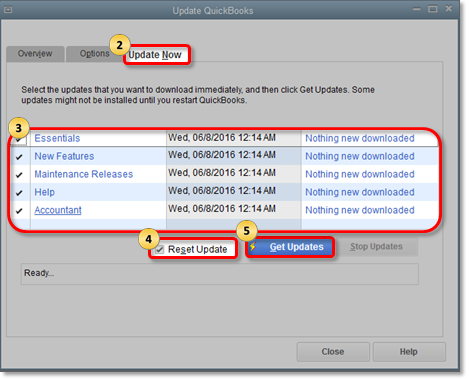
After following the steps I've shared above, let's proceed with running the Verify Data and Verify Rebuild tools. These options will help self-identify data issues within a company file and self-resolve them using Rebuild Data.
To run Verify Data:
For the Rebuild Data option, here's how:
Lastly, restart your QuickBooks and switch to single-user mode. You should be able to change between modes without force closing the program.
You can also check this article for more details about how to use the QuickBooks Tool Hub to repair QuickBooks: Fix common problems and errors with the QuickBooks Desktop Tool Hub.
Drop me a comment below if you have any other questions about navigating QuickBooks or using multiuser mode. I'll be happy to help you some more.

