Turn on suggestions
Auto-suggest helps you quickly narrow down your search results by suggesting possible matches as you type.
Showing results for
Welcome to the Community, Frikkie. Let’s work together on creating a bill from your email and upload a document.
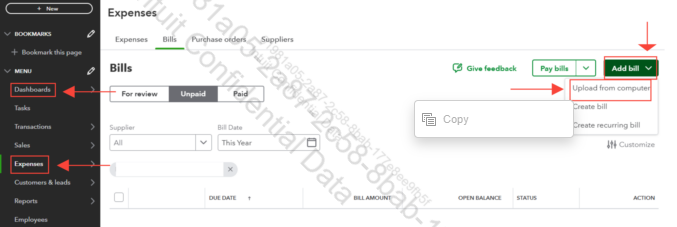
The function is automatically turned on, and you can easily upload a bill from your email or any other document. I’ll walk you through how to upload any document or bill file from your computer. Like PDF, JPEG, JPG, GIF, and PNG images. Depending on which bill you want to add to your QBO.
Here’s how:
1. Hover over the Menu and click Expenses.
2. Select Bills under Expenses.
3. Click Add bill dropdown.
4. Choose Upload from your computer.
For more information, you can refer to this article: Enter and manage bills and bill payments in QuickBooks Online.
If you have additional concerns about QuickBooks, please let us know. We’re here to help.

