Turn on suggestions
Auto-suggest helps you quickly narrow down your search results by suggesting possible matches as you type.
Showing results for
Get 50% OFF QuickBooks for 3 months*
Buy nowThank you for your efforts in addressing the PDF issues in QuickBooks Desktop (QBDT), WilliamB89! It's wonderful to have you back in the Community! I hope you're doing well. I understand how essential a seamless QuickBooks experience is for your business operations. Rest assured, our team is dedicated to resolving this promptly, allowing you to concentrate on what truly matters: managing your business activities.
Since you've carefully performed all the necessary troubleshooting steps to fix PDF issues in QBDT, I recommend reaching out to our QuickBooks Live Support team once more for further assistance. They'll gather some additional information from you and provide clear guidance on the next steps to take. To connect with them, follow these steps:
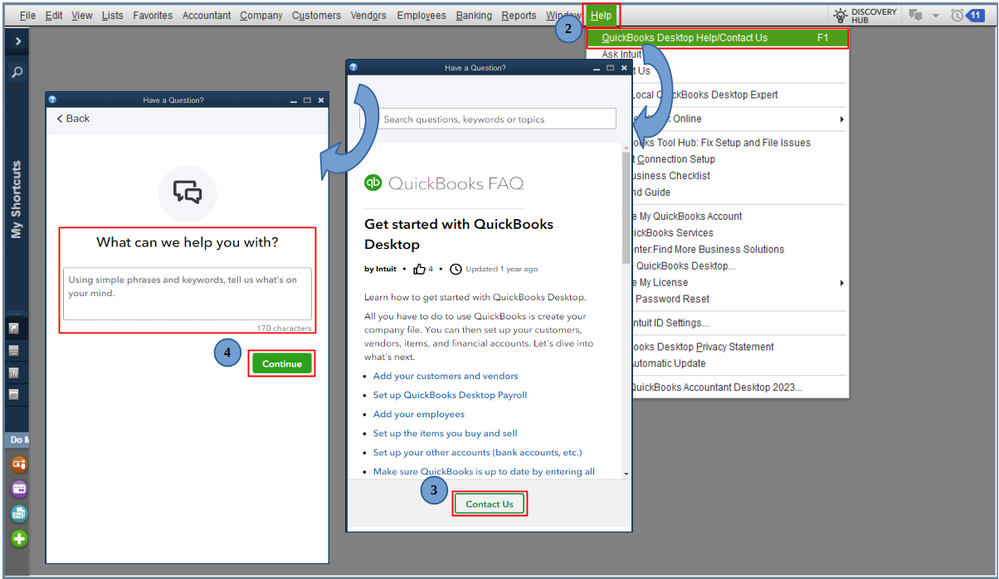
Additionally, you have the convenience of accessing your company file remotely from a host or server computer with QBDT. If you're interested in learning more about how this works, I encourage you to check out this article: Open QuickBooks Desktop from a different computer than your server.
I appreciate your patience as we work to address this, WilliamB89. If there are any additional questions or you need further clarification about printing reports, please don’t hesitate to click the Reply button. I’m always here to help. Take care!

