Turn on suggestions
Auto-suggest helps you quickly narrow down your search results by suggesting possible matches as you type.
Showing results for
CYBER MONDAY SALE 70% OFF QuickBooks for 3 months* Ends 12/5
Buy nowLet's bring your old QuickBooks data to your new version of the product, garnerlandscapin.
Since your version of QuickBooks Desktop 2014 is outdated, you may need to use an upgraded version of the software. You'll want to download a free trial version and use it in transferring your files to QBO.
For complete instructions on how to download the trial version, kindly check out this link: Download a trial of QuickBooks Desktop.
Then, you can start migrating your data from QBDT to QBO. Let me share the instructions below:
Log in as an admin to the company file you need to import.
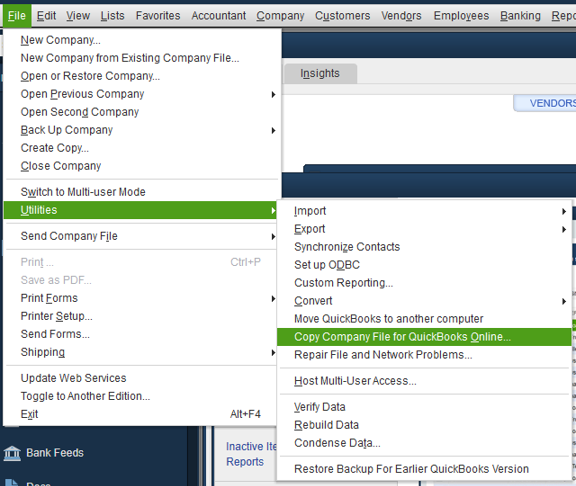
Here's an article that will guide you through the whole process of moving your QuickBooks Desktop file to QuickBooks Online.
If you need other helpful articles in the future, you can always visit our site: Help articles for QuickBooks Desktop.
Get back to me if you have other questions. I'm always happy to help you further. Keep safe and have a great rest of the day!

