Turn on suggestions
Auto-suggest helps you quickly narrow down your search results by suggesting possible matches as you type.
Showing results for
Get 50% OFF QuickBooks for 3 months*
Buy nowI can help you in moving your info from QuickBooks Self-Employed (QBSE) to QuickBooks Online (QBO), @zelda-zeldaowens.
You can move your data directly from QuickBooks Self-Employed (QBSE) to QuickBooks Online (QBO) if you have the Explore QuickBooks Online plans from the Billing info page of your QBSE account. If you don't have this option, then you'll need to do it manually.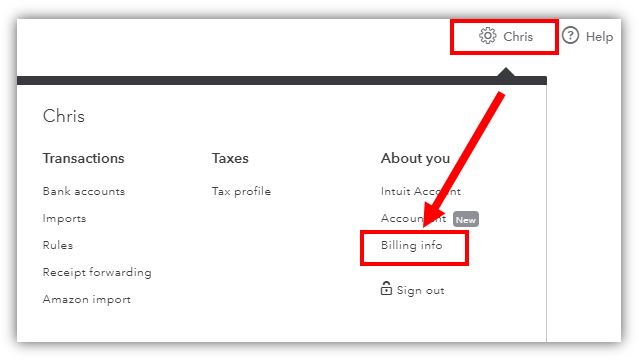
After choosing the version of QuickBooks Online that you'd like to upgrade from the Billing info page, follow the steps below:
In case, you don't have this option, then you'll need to download your transactions in a CSV file and upload them into QBO.
You can export your bank transactions in QBSE by going to the Transactions tab. Here's how:
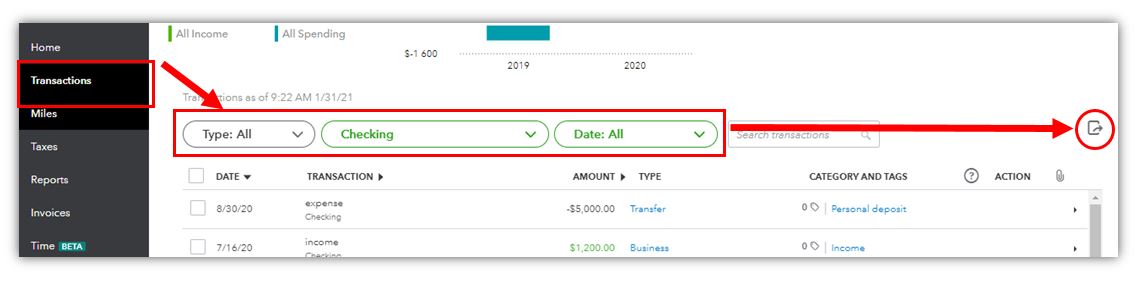
See this switch from QuickBooks Self-Employed to QuickBooks Online article for detailed guidance.
Here are some video tutorials that can help you get started with QuickBooks Online: Video tutorials for QuickBooks Online.
Let me know if there’s anything else that I can assist with your bank transactions by leaving a comment below. I’m always here to assist. Have a wonderful day!

