Turn on suggestions
Auto-suggest helps you quickly narrow down your search results by suggesting possible matches as you type.
Showing results for
Thanks for looping in, NickPace.
I'm here to help you get the QFX file into QuickBooks Desktop. Let's get started.
The QFX file is also known as a WebConnect file. However, this format is only supported in QuickBooks Online. While in QuickBooks Desktop, the supported format is the .qbo file.
You will first need to convert the QFX file into .qbo file to import the transactions into the desktop version.
To download web connect files:
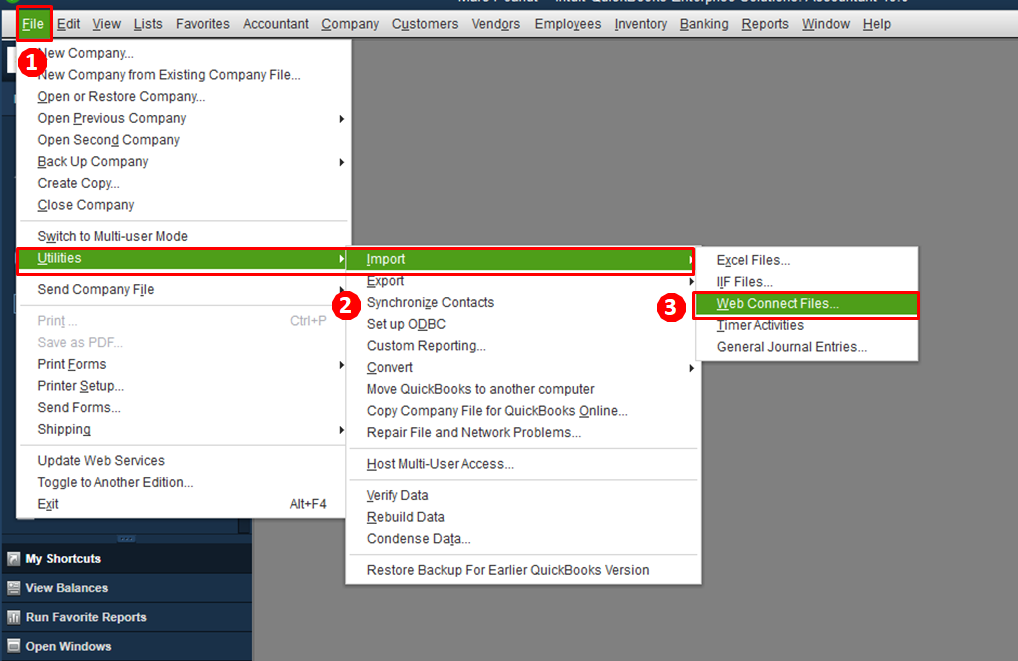
You can get more details in this article: https://quickbooks.intuit.com/community/Banking-and-bank-feeds/Import-web-connect-qbo-files/m-p/1858....
If you need more help with importing bank transactions in QuickBooks Desktop, please let me know. Have a great rest of your day.

