Turn on suggestions
Auto-suggest helps you quickly narrow down your search results by suggesting possible matches as you type.
Showing results for
CYBER MONDAY SALE 70% OFF QuickBooks for 3 months* Ends 12/5
Buy nowTo allow your auditor to view the transactions detail by account report, we need to use the view company reports, GWNWUPDF. This will prevent them from making any altering to the transactions. Here are the steps to do this:


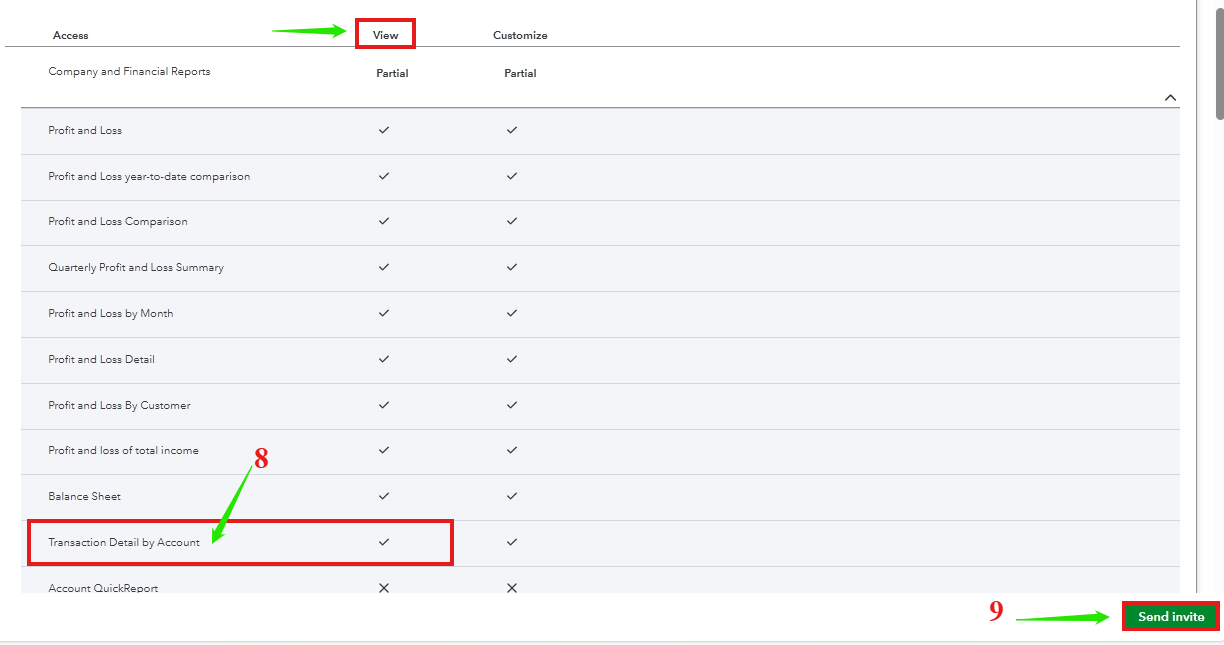
Moreover, if you want to configure and save a report for easy future access. You can check this article as your guidelines: Memorized reports in QuickBooks Online.
If you have any questions regarding reports or need further assistance, feel free to hit the Reply button. I'm always here to help!

