Turn on suggestions
Auto-suggest helps you quickly narrow down your search results by suggesting possible matches as you type.
Showing results for
Get 50% OFF QuickBooks for 3 months*
Buy nowIt's nice to see you here, @charliewhite,
We want to make sure you're able to activate your license without any issues. You can register the product without the validation code using the manual registration. Go to the Help menu then About QuickBooks Desktop. When you see the green logo, press CTRL + R + P on your keyboard.
If you're still unable to do it on your own, I recommend contacting our Support Team to generate a validation code for you. This code is used to automatically activate the software without going through the manual information entry.
Please note that our representatives are currently available through chat or messaging. Make sure to enable pop-up windows on your browser settings to launch the chat box and connect with our live agents. To get our Support, follow the steps below:
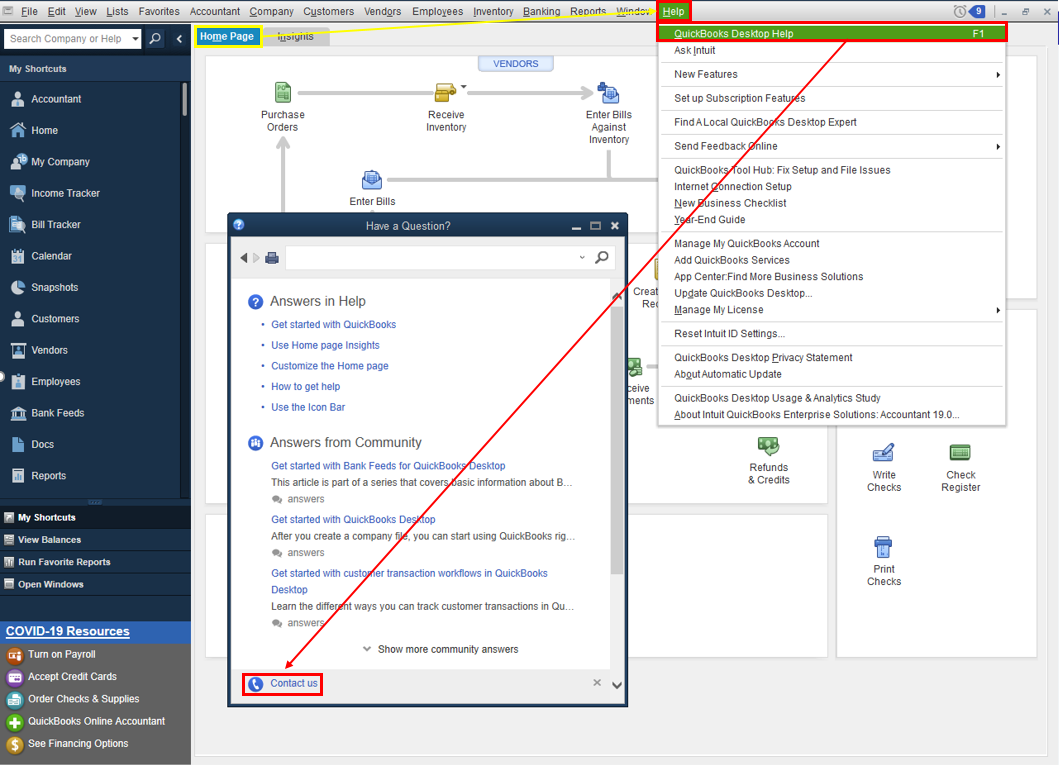
When you're connected, our representative will ask the license and product number of the software you purchased.
I want to make sure this is resolved, so if you need further help, let me know in the comments. I'll be right here to assist you anytime. Have a good one!

