Turn on suggestions
Auto-suggest helps you quickly narrow down your search results by suggesting possible matches as you type.
Showing results for
CYBER MONDAY SALE 70% OFF QuickBooks for 3 months* Ends 12/5
Buy nowThanks for reaching out to the Community, @JB70.
I'm here to help you remove the BCC line when you send out statements in QuickBooks.
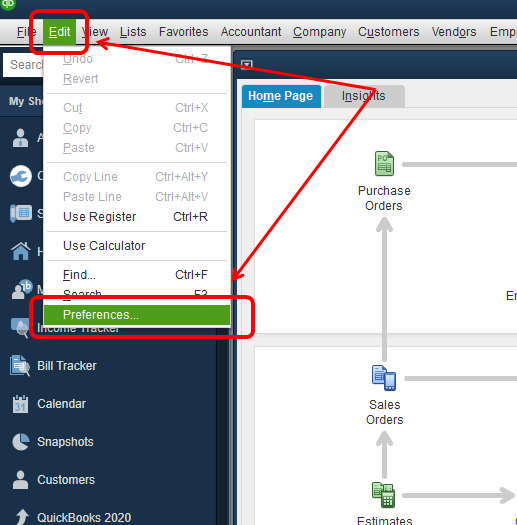
In just a few steps, you'll have the BCC removed. We just have to adjust the email settings in QuickBooks. Here's how:
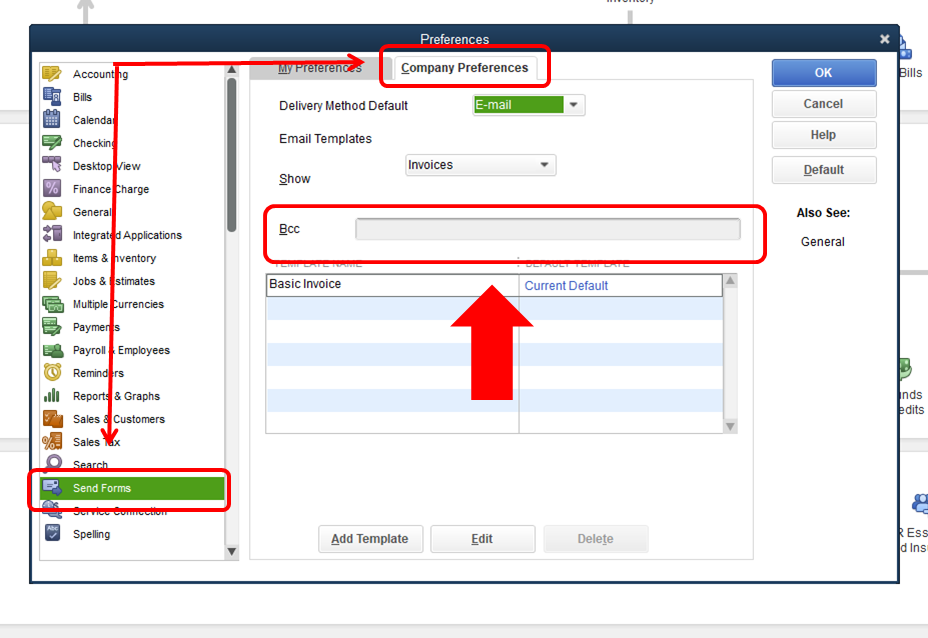
2. Click on Send Forms in the left-hand menu, then proceed to the Company Preferences tab.
3. Remove the email address in the BCC field.
4. Hit OK.
That's all there's to it! You can refer to these Community Articles to learn more about how QuickBooks and emails will work for you:
If you need further assistance, please don't hesitate and reach back out to me! Have a nice day.