

- Mark as New
- Bookmark
- Subscribe
- Permalink
- Report Inappropriate Content
Sales & Customers
Let's make sure this information is successfully added to your customer profile, @vanislecarpetcleaning.
Before proceeding, is it not appearing while you are creating the invoice (in the invoice window) or only on the print/preview page? Did this issue happen after you edited the customer's profile details and then created the invoice?
QuickBooks Online does not automatically update existing transactions when you change a customer's profile (it is not retroactive). The original invoice keeps the old details.
To successfully sync the new customer information, delete the current invoice and create a new one.
Here's how to do it:
- Go to the My Apps tab and select Sales & Get Paid.
- Click Invoices.
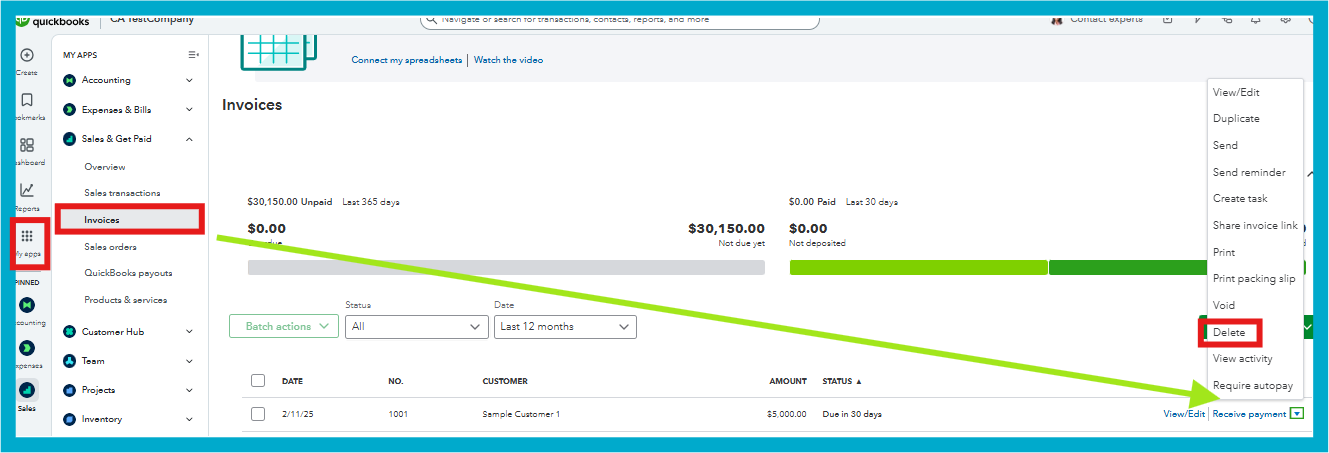
- Locate the relevant invoice, then use the actions dropdown menu to select Delete.
You can manually add the customer's name using the dropdown menu if it's missing on the invoice creation page.
Feel free to reach out here again if you have further questions or need additional assistance. We're here to help.
