

- Mark as New
- Bookmark
- Subscribe
- Permalink
- Report Inappropriate Content
Payments
I appreciate you following up on this thread, LCHt.
You may want to follow the steps to refund an e-check in QuickBooks Payments. Here's how:
- Sign in to the Merchant Service Center.
- From the Processing Tools, select Void an eCheck.
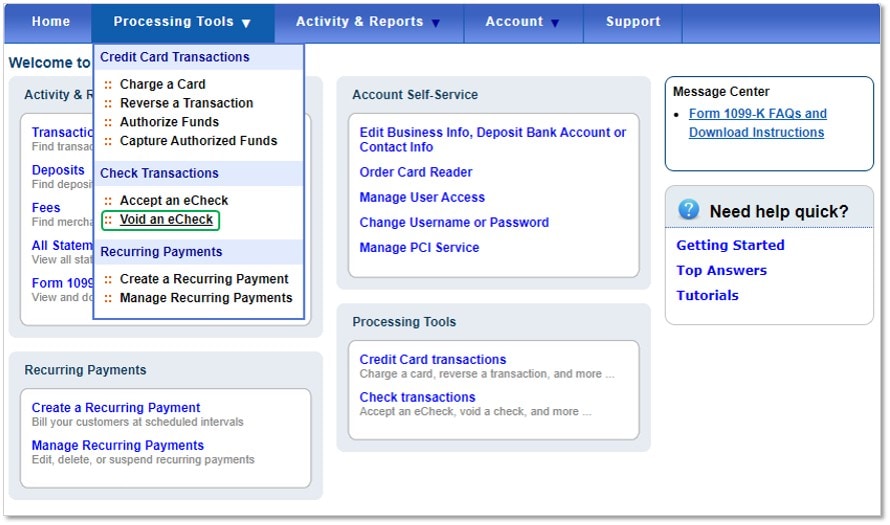
- Select the appropriate eCheck(s) to void.
- Hit Submit to complete the process.
Please be reminded that the voiding or refunding process isn't possible if the transaction is not available. You can get more details in this article: Void an eCheck transaction.
If you're still unable to refund the e-check, I'd suggest getting in touch with our Merchant Services Support to help you sort this out.
I'm leaving some recommended pointers to learn more what the types of charges as well as things to remember when processing credit cards. Also, this will provide you other methods for processing payments in QuickBooks:
Add or modify the accepted credit card types in QuickBooks.
Take and process payments with QuickBooks Payments
If there's anything else you need, please let me know. I'll be standing by to provide additional assistance. Have a good one.
