

- Mark as New
- Bookmark
- Subscribe
- Permalink
- Report Inappropriate Content
Other questions
Thanks for getting back to us, jaapkrijger.
Let me help you run a report to see which is short and about reversing a stock-related transaction.
You can pull up the Inventory Stock Status by Item report to see the number of inventory on hand. Let me show you how to do it.
- Click Reports.
- Select Inventory, then Inventory Stock Status by Item.
- From the report, check the On Hand column to see the number of available stocks.
- You'll also see pending builds under the For Assemblies column.
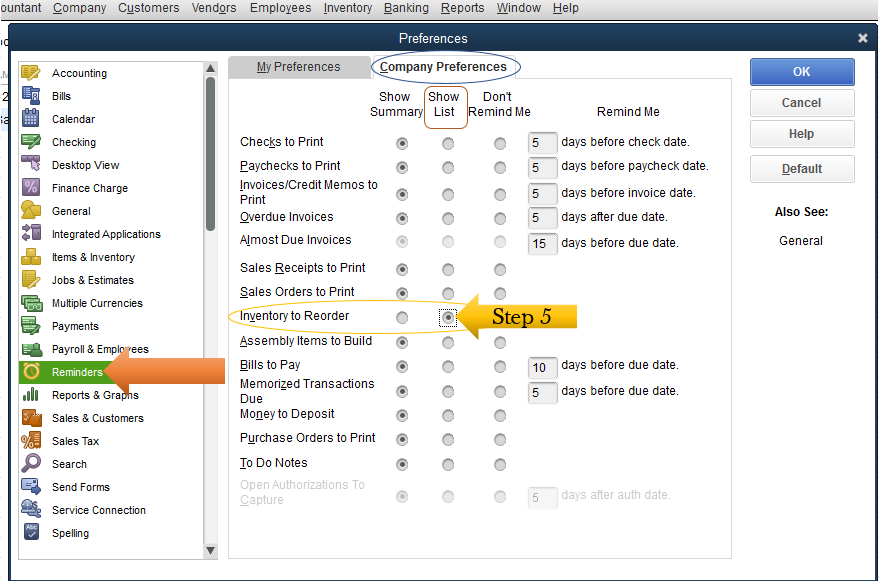
Also, QuickBooks lets use the reorder points and receive a notification that your items are low. Let me show you how:
- At the top menu bar, click Edit.
- Go to the Preferences.
- Select Reminders.
- Choose Company Preferences.
- On the Inventory to Reorder option, select the Show List radio-button.
For reversing a stock, you can make adjustments to an inventory entry in the previous month. That way, you'll be able to rebuild pending assemblies.
Let me share the steps again for you:
- Go to the Inventory menu at the top.
- Select the Inventory Center.
- Choose the assembly item, then open the pending build.
- Adjust the date under the Date drop-down menu.
- Hit the Remove Pending Status button.
- Tap Build & Close.
Please refer to this article below to know which report will help with inventory management.
,
Stay in touch with us if you have other questions aside from building assembly concerns. We're always willing to help. Take care!
