
- Mark as New
- Bookmark
- Subscribe
- Permalink
- Report Inappropriate Content
Mass un-pending of builds
When a stock out resulted in builds going pending... can a restock un-pend the builds the same way?


- Mark as New
- Bookmark
- Subscribe
- Permalink
- Report Inappropriate Content
Other questions
I've got you some information about the un-pending build in QuickBooks Desktop, @jaapkrijger.
I can see the importance of changing or un-pending mass builds in your business. Currently, this option is unavailable in QuickBooks. What we can do is edit them individually and change the status.
To change the Pending status, you can edit the date of the inventory received to a day before the Build Assembly was created or have the items/quantity on hand on your build date. Doing this will enable the Remove Pending Status button and let you complete the build.
Here's how:
- Go to the Inventory menu at the top.
- Choose the Inventory Center.

- Select the assembly item, then open the pending build.
- Modify the date under the Date drop-down menu.
- Select the Remove Pending Status button.
- Click Build & Close.
Additionally, let me share with you how to track the products you manufacture. It provides you with some insights on how to manage the products you build using inventory parts.
Fill me in if you have other questions about handling inventory products in QuickBooks Desktop. I'll be around to help you. Stay safe and have a good one.
- Mark as New
- Bookmark
- Subscribe
- Permalink
- Report Inappropriate Content
Other questions
It's logical you can do them individually, was hoping for a bulk way. Have taken 2 days to clear it all up... there should be a way to do this easier tho
- Mark as New
- Bookmark
- Subscribe
- Permalink
- Report Inappropriate Content
Other questions
Is there a way to reverse a stock related transaction? So that the effects of a short are reversed as well?
I also think that, incase a transaction causes unbuilding of assemblies, it would be good to mention which item is 'overdrawing'. That way we can understand the magnitude of posting the transaction.
There is a similar thing when building assemblies, the assembly will refuse to be built due to short, but it won't tell you which item is short....


- Mark as New
- Bookmark
- Subscribe
- Permalink
- Report Inappropriate Content
Other questions
Thanks for getting back to us, jaapkrijger.
Let me help you run a report to see which is short and about reversing a stock-related transaction.
You can pull up the Inventory Stock Status by Item report to see the number of inventory on hand. Let me show you how to do it.
- Click Reports.
- Select Inventory, then Inventory Stock Status by Item.
- From the report, check the On Hand column to see the number of available stocks.
- You'll also see pending builds under the For Assemblies column.
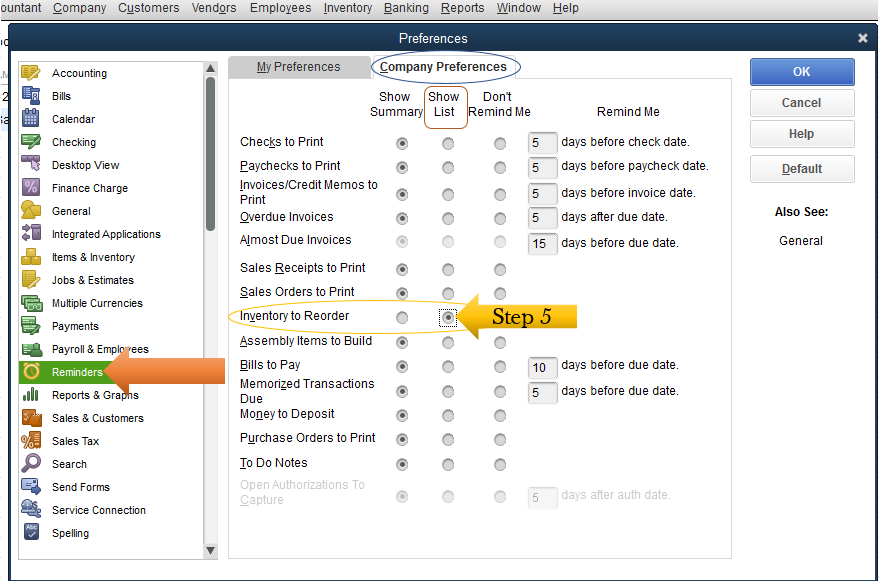
Also, QuickBooks lets use the reorder points and receive a notification that your items are low. Let me show you how:
- At the top menu bar, click Edit.
- Go to the Preferences.
- Select Reminders.
- Choose Company Preferences.
- On the Inventory to Reorder option, select the Show List radio-button.
For reversing a stock, you can make adjustments to an inventory entry in the previous month. That way, you'll be able to rebuild pending assemblies.
Let me share the steps again for you:
- Go to the Inventory menu at the top.
- Select the Inventory Center.
- Choose the assembly item, then open the pending build.
- Adjust the date under the Date drop-down menu.
- Hit the Remove Pending Status button.
- Tap Build & Close.
Please refer to this article below to know which report will help with inventory management.
,
Stay in touch with us if you have other questions aside from building assembly concerns. We're always willing to help. Take care!

- Mark as New
- Bookmark
- Subscribe
- Permalink
- Report Inappropriate Content
Other questions
hi,
they rebuild themselves when you add the missing quantity of whatever stock item was missing for the build,
just make sure that the missing inventory item(s) replacement dates are earlier than the earliest Build Pending.
run the report Pending Builds in the Inventory section of Reports.
thanks for the question
