

- Mark as New
- Bookmark
- Subscribe
- Permalink
- Report Inappropriate Content
Other questions
Thank you for taking the time to write back with further details, Goebel. I appreciate you outlining your queries and the importance of resolving this.
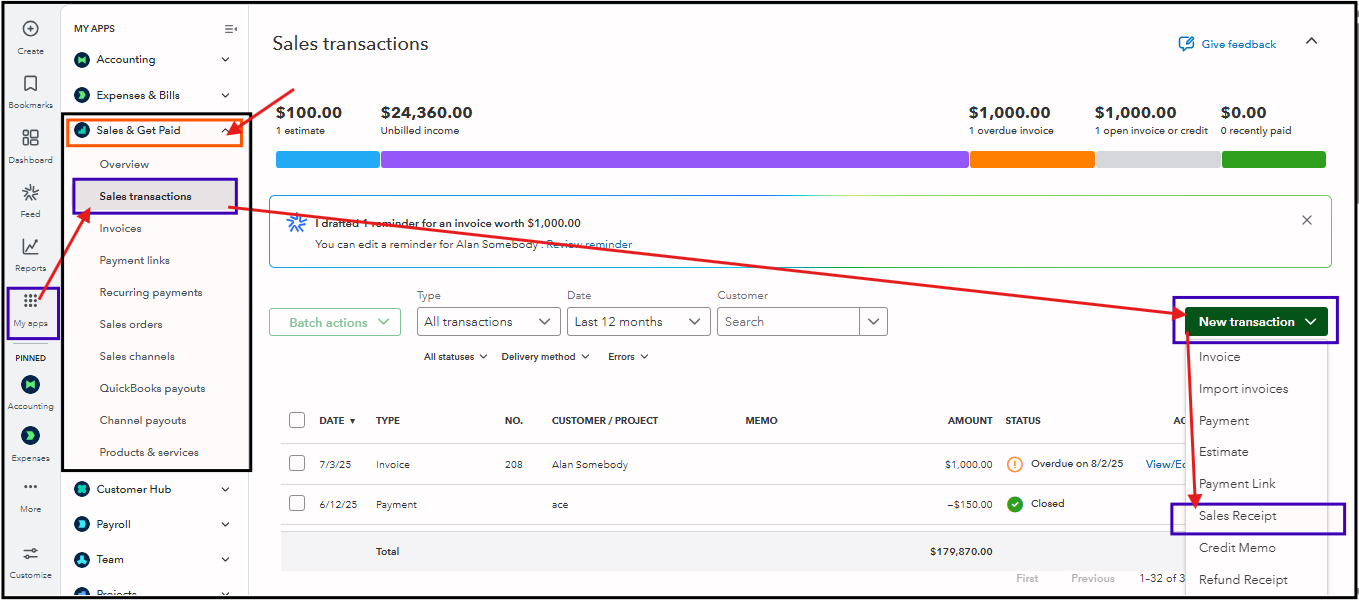
Yes, you are right that the Sales Receipts aren't available under the Sales & Get Paid tab. However, we can create a new sales receipt either from the main + New button at the top of the dashboard or by navigating to the Sales Transactions tab.
Here's how:
- From My Apps, click the Sales & Get Paid dropdown.
- Select the New transaction dropdown under the Sales Transactions tab.
- Then, choose the Sales Receipt.
Additionally, please also know that the ability to back up and restore a company file is an exclusive feature of QuickBooks Online Advanced. This functionality isn't available in other QuickBooks Online plans, including QuickBooks Online Plus.
Since the backup and reset feature is vital for your business tasks, it is recommended to upgrade your plan for your convenience.
I also appreciate your effort in finding a way to convert your inventory to ounces. We're very interested to hear how the initial testing of the process went.
