

- Mark as New
- Bookmark
- Subscribe
- Permalink
- Report Inappropriate Content
Other questions
This is not the kind of service we want you to experience, @water89 and @Hazel2019. Let me chime in so you can use the Estimates seamlessly in QuickBooks Online.
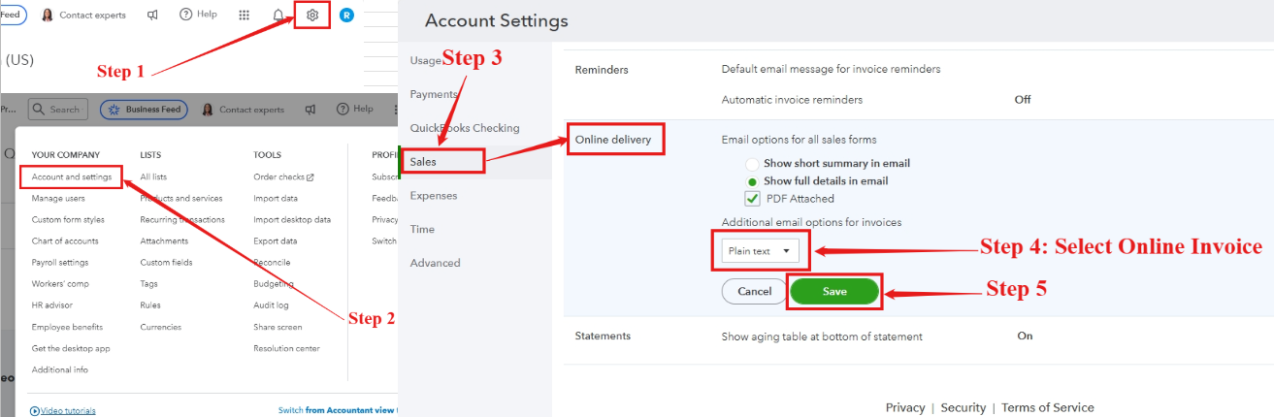
Our system engineers have discovered that the issue is related to having Plain text selected under Online delivery in your Sales settings. I'll provide the steps on how to change it.
Here's how:
- Click on the Gear icon in the top right corner
- Select Account and Settings.
- Go to the Sales tab, and scroll down to Online delivery.
- Change the Plain text to Online invoice.
- Click Save.
This solution has resolved the issue for most users experiencing it. I also recommend following the workaround provided by @rgsitconsulting, which is greatly appreciated. However, if you've already tried this and are still encountering the problem, I strongly recommend contacting our QuickBooks Online live support team. They can provide real-time assistance and additional solutions on this issue.
To contact live support:
- Navigate to the Help menu.
- Click the Search option and type contact support.
- Choose the Contact Us tab at the bottom.
- Follow the prompts, then choose a way to connect with us: Have us call you or Chat with us.
For more details about how to contact us and our support hours, please check this article: Get help with QuickBooks products and services.
Additionally, if you're looking to understand the process of transforming an estimate into an invoice in QuickBooks Online, this article provides a thorough guide: Convert an estimate into an invoice in QuickBooks Online.
We greatly appreciate your patience. If you have any further inquiries about managing your estimates or anything else related to QuickBooks, please don’t hesitate to reach out. The Community is always ready to assist you.
