

- Mark as New
- Bookmark
- Subscribe
- Permalink
- Report Inappropriate Content
Other questions
Turning off the auto populate when creating a vendor in the bank transaction feed can be a great option, and I'll gladly help you submit this thought to our product developers, Yo_Be_Low2.
To begin with, please know that when adding a new vendor in the transaction directly, the system extracts the information from the transaction description and fills these fields to streamline data entry. This automation is intended to save you time by preemptively filling out data fields.
Since you want to stop this automation, I recommend submitting direct feedback to our product engineers:
- Go to the Gear icon. then select Feedback.

- Enter your comments or product suggestions.
- Select Next to submit feedback.
Your feedback on this is greatly appreciated, and it helps QuickBooks consider such scenarios for potential updates in their features. If you'd like to track the status of your feedback, please visit our QuickBooks Customer Feedback page.
In the meantime, I recommend clicking the + Add New icon to add a vendor, instead of doing so directly in the transaction. Allow me to guide you through the process:
- Navigate to Transactions, then select Bank Transactions menu.
- Select a Transactions, then click the Vendor/Who paid you drop-down.
- Choose + Add New, then manually enter the name of the vendor
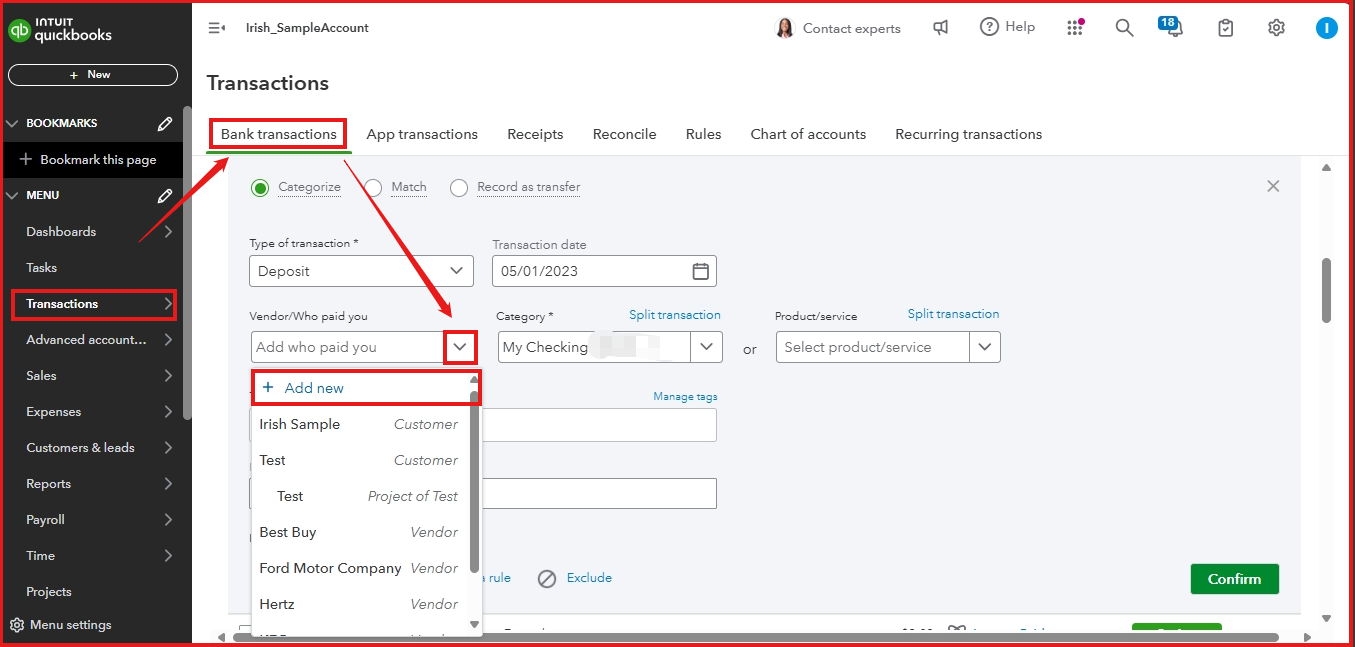
- Follow the on-screen instructions.

Once done, you can check out these articles to learn how to get a report on all money paid to a vendor for the year and save a monthly expense report:
- Run a report with vendor totals in QuickBooks Online
- Run and save a monthly expense report by vendor in QuickBooks Online
Your feedback is invaluable to us, Yo_Be_Low2. We hear your sentiments and are here to provide further assistance with managing your vendors in QBO.
