

- Mark as New
- Bookmark
- Subscribe
- Permalink
- Report Inappropriate Content
Other questions
Hello ELM33, I appreciate you for providing details about your concern. Let's work together and see why it happened. Then
A journal entry with billable customers should generate in the unbilled cost lists. It only disappears when you create an invoice for the billable costs. Since you mentioned that the billed item remains on the unbilled costs lists, we need to perform some steps to fix this odd behavior.
- Close QuickBooks.
- Run as administrator.
- Then, update QuickBooks release.
I also recommend following the solutions in this article to fix minor data issues with your company file: Fix data damage on your QuickBooks Desktop company file.
Just in case you need additional guidance applying the billable costs created from JE to an invoice, feel free to use the steps below. It removes the billed item to the unbilled costs lists.
- Go to the Customers menu and select Create Invoice.
- Make sure to select appropriate client in the Name field.
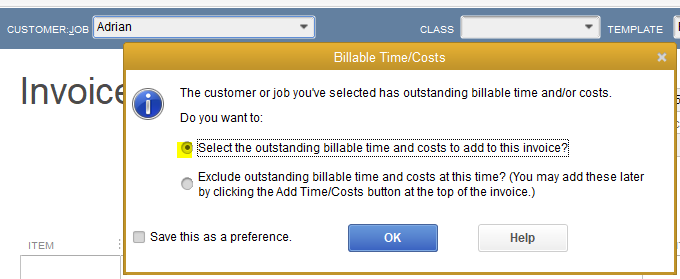
- You'll be prompted to two options. Pick the Select the outstanding billable time and costs to add to this invoice? option.
- Click OK.
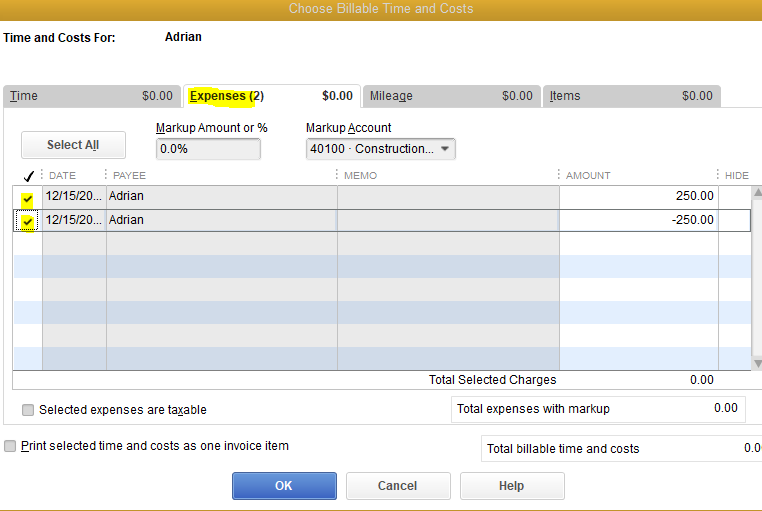
- In the Expenses tab, tick the clients name.
- Hit OK.
Additionally, when recording a journal entry, the billable box only appears when using the Asset, Expense, and Other Expenses accounts and selecting a customer in the Name column.
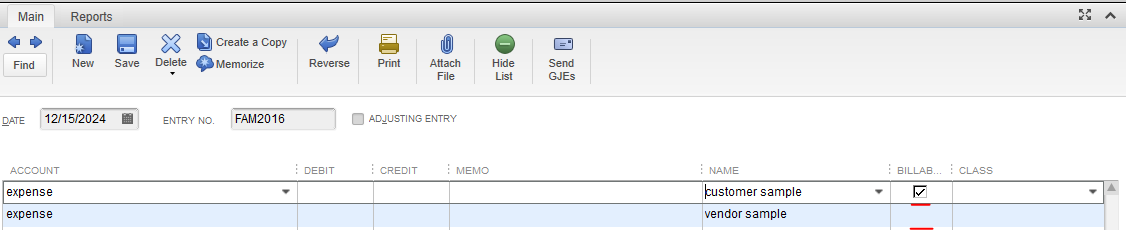
Note: Vendor, employee, and other names aren't applicable for this.
I want to make sure that you'll get the details you need and be able to fix everything when recording journal entries. Please know that you can go back to this thread and post if you have follow-up concerns. I'll be around whenever you need help. Take care and stay safe.
