

- Mark as New
- Bookmark
- Subscribe
- Permalink
- Report Inappropriate Content
Other Questions
Thank you for providing the full context for your concern, @Clintonious_AC.
Using a personalized invoice template in QuickBooks Online is an excellent way to enhance the system. We're always looking for ways to make your QuickBooks experience more convenient and enjoyable.
I'd appreciate it if you could take a moment to provide feedback to our product engineers. Thus, they will notify and review your suggestions to consider adding them in future releases.
Proceed to:
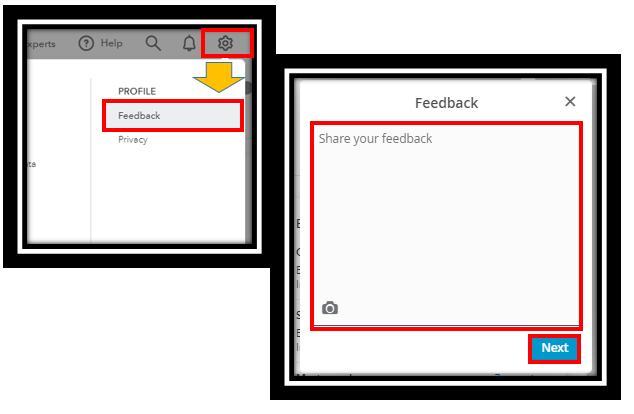
- Go to the Gear icon on the upper right hand.
- Select the Feedback button.
- Type your suggestions in the field and click Next.
Many of the program's current features, as well as upcoming ones, are based on requests and feedback from users. QuickBooks also has a website where you can vote, comment on ideas, and suggest your own: Customer Feedback for QuickBooks.
The specific details you can customize on an invoice template can be found in this article: Customise invoices, estimates, and sales receipts in QuickBooks Online.
Did you know that QuickBooks allows you to import your own templates? For more details, see this article: Import custom form styles for invoices or estimates. Please be aware that only old QuickBooks Online accounts (those created before June 29, 2021) can use this functionality.
Lastly, browse these articles below to know the benefits of using QuickBooks multicurrency feature and custom fields:
- Add custom fields to sales forms and purchase orders in QuickBooks Online.
- Turn on and use multicurrency in QuickBooks
You can always reply here if you have any additional inquiries about invoicing or other subjects. I'll get back to you right away and lay out the specifics. Be safe.
