

- Mark as New
- Bookmark
- Subscribe
- Permalink
- Report Inappropriate Content
Manage customers and income
QuickBooks Online has a feature that allows you to receive a copy of the emails you send, CB1973.
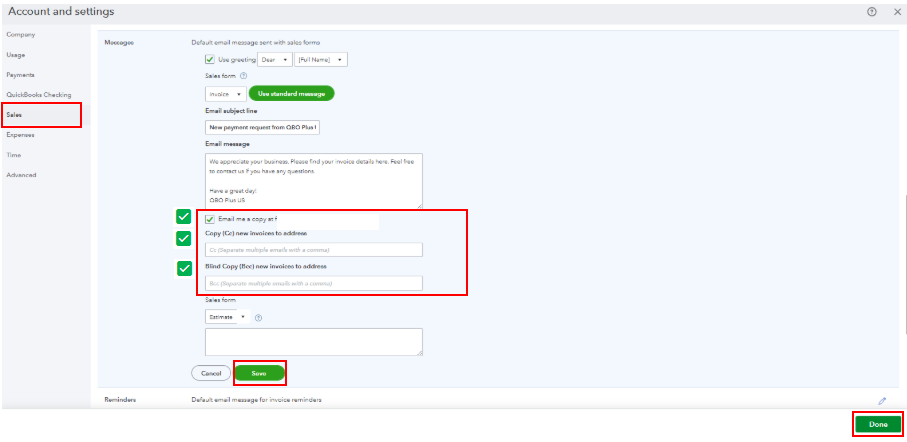
You can configure this setup in your company’s settings and enable the Email me a copy option. To guide you, refer to these steps:
- In your QBO account, navigate to the Gear icon and select Accounts and Settings.
- From the Sales tab, scroll to the Messages section and enable the Email me a copy option.
- Alternatively, you can enter a specific email address in the Carbon Copy (CC) or Blind Copy (BCC) fields. This way, you'll automatically receive a copy of every email sent to your customers.
- Once done, review all information. Then, Save and Done.
On top of that, we don’t have a direct way to view the actual email that was sent to your customers. As a workaround, you can check your inbox to review the copy of the emails you’ve received.
If you wish to check and verify the status of the emails sent, you can follow the suggestions provided by my colleagues above.
Let me know anytime on this forum if you require any further assistance.
