


- Mark as New
- Bookmark
- Subscribe
- Permalink
- Report Inappropriate Content
Manage your account
Cancelling your QuickBooks account that was created accidentally is simple, @yan7. I will show you the detailed information below.
The steps to revoke your subscription will depend on where you signed up. For example, if you got it through a mobile app store, you need to return to the app store and cancel your account. If you purchased it directly from Intuit, you can follow the steps below:
- Sign in to the Intuit Account Manager.
- Find Products & Billing, then select your company name. This will take you to your subscription page.
- Locate the product you wish to cancel, then choose Cancel.
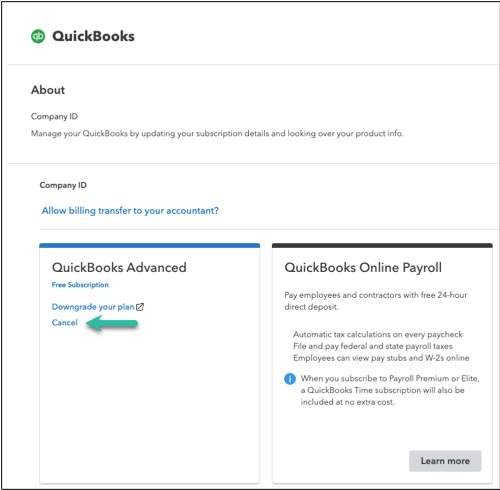
- Follow the on-screen steps. After your cancellation is successful, you’ll get a confirmation.
Check out this article for the other ways to revoke your subscription: Cancel your subscription.
I am always available whenever you need additional assistance in managing your account, especially when we talk about cancellation. Have a good day.

- Mark as New
- Bookmark
- Subscribe
- Permalink
- Report Inappropriate Content
Manage your account
I would like to cancel my subscription n be refunded the 37.00 i was charged for as i dont use this app


- Mark as New
- Bookmark
- Subscribe
- Permalink
- Report Inappropriate Content
Manage your account
You have two options to cancel your account, depending on where you sign in to your QBO account, Jones.
If you purchased your QuickBooks Online (QBO) account directly from Intuit, you can follow the steps provided by my colleague, Bryan_M, for further assistance. If you signed up for QBO through the mobile app, please follow the steps outlined below:
For Apple users:
1. Go to the Settings app on your iPhone or iPad.
2. Choose your Name to access your Apple ID.
3. Then, select Subscriptions and click QuickBooks Online.
4. Once done, click Cancel.
For Android users:
1. Go to the Play Store app and select the Profile icon.
2. Click Payments & subscriptions, then click Subscriptions.
3. Choose the QuickBooks Online app.
4. On the Manage Subscriptions window, click Cancel Subscription.
For detailed guidance on canceling your account and what happens to your data, see this article: Cancel your subscription.
For the refund, I'd recommend contacting our Live Support team. They can look into your account and process the refund for you. For their contact details, see this article and choose QuickBooks Online: Get help with QuickBooks products and services.
Please stay in touch if you need anything else. I'm here to help.
