

- Mark as New
- Bookmark
- Subscribe
- Permalink
- Report Inappropriate Content
Install
You're in the right place for help, and I'm here to give you quick tips to see the correct product number, @Kjartved.
When you want to get the QuickBooks Desktop (QBDT) license number and product code, you can press F2 on your keyboard while the QuickBooks Desktop window is running.
Another way is to visit the Customer Account Management Portal (CAMPS) to get your product and license number from there as long as you registered the product.
Also, if you purchased QuickBooks in a physical retail store, the license and product code number will be listed on the packaging.
Take a look at the scratch-off sticker located next to the UPC code. Here's how it looks like:
However, if you're unable to find it using the options given above, you can contact our Support Team for it. Account specific concerns is best handled by our Live Help representatives to secure any confidential information that we can't display in this public forum. Feel free to check their support hours for a few details.
To reach us:
- Open QuickBooks and click the Help menu.
- Select QuickBooks Desktop Help.
- On the pop-up screen select Contact us.
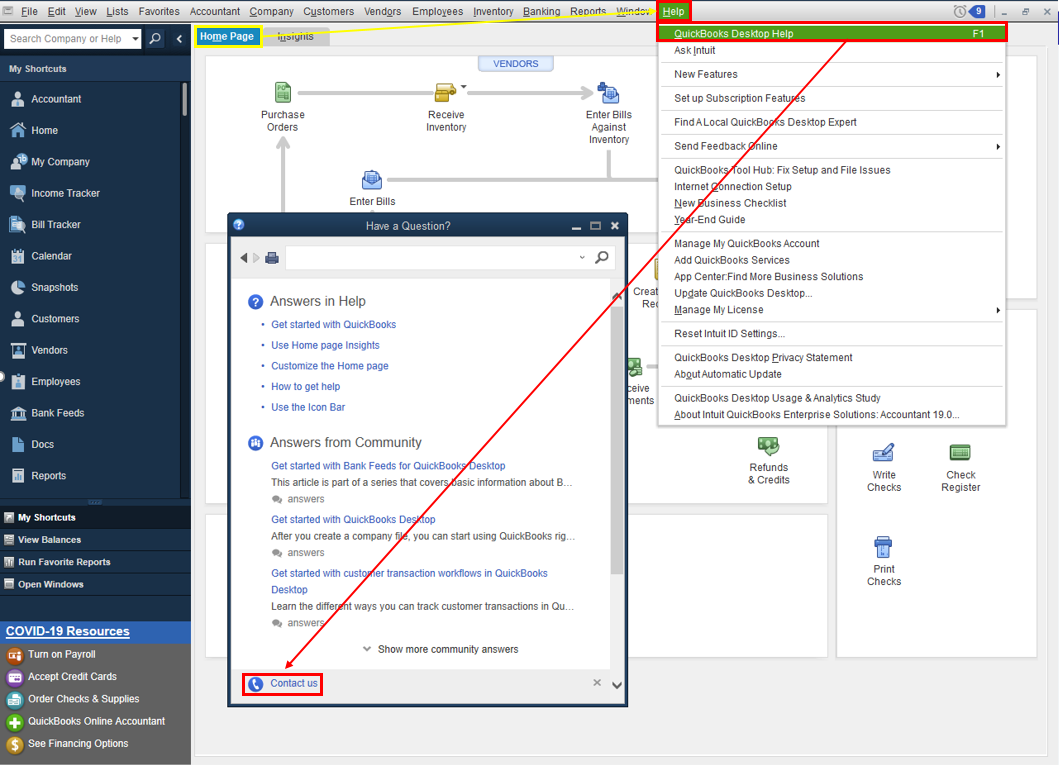
- Click the Search for Something else button then type your concern in the Ask us anything box.
- Hit Search then scroll down to get your contact options.
You might want to check out these articles to learn how to get started with QBDT:
- Get started with QuickBooks Desktop
- QuickBooks Desktop service discontinuation policy and upgrade information
Please keep in touch with me for all of your QuickBooks setup needs. I'm always ready to help. Have a good one and stay safe.
