

- Mark as New
- Bookmark
- Subscribe
- Permalink
- Report Inappropriate Content
Employees and payroll
Thanks for posting here, @userkuhnfarms. I'm here to help you change the date of the payroll checked entered in QuickBooks Online (QBO).
I appreciate you sharing the detailed information about your concern. To resolve this, you'll have to delete and recreate the paycheck. Follow along below to get this done right away.
- In your QBO company, go to the Payroll menu.
- Next, select Employees and click the Paycheck list link.
- From there, select the paycheck you need to update. Take note of the details for reference.
- Click the amount under the Net Pay column to open the paycheck details.
- Then, select the Delete button and check the I understand that this action cannot be undone box and click Delete Paycheck.
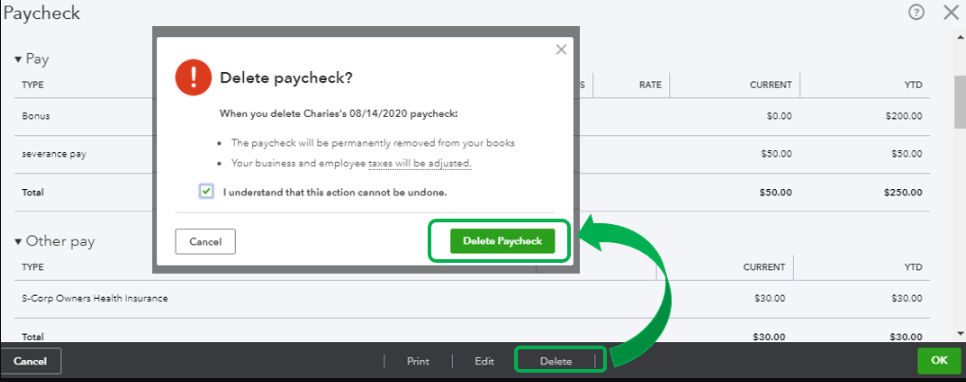
Once done, recreate the paycheck with the correct date. For reference about managing payroll in QBO, check out this article: Create and run your payroll.
Additionally, the program offers a variety of payroll reports that you can access to easily monitor your employees and account info. For the complete list and their description, feel free to check this article: Run payroll reports.
I'd love to know how the steps go. I'd appreciate any updates you can add. If you have additional questions about creating paychecks in QBO, feel free to post a comment below. I'm always around and ready to lend a hand. Have a good day and take care.
