


- Mark as New
- Bookmark
- Subscribe
- Permalink
- Report Inappropriate Content
Employees and payroll
We can create a sub-customer by navigating through the Sales or Customers & Leads menu in QuickBooks Online (QBO), Sisonnn.
Before you can create one, make sure the parent customer is already set up. Now, here's how to create a sub-customer:
- Go to Sales or Customers & leads menu, then select Customers.
- Click the New customer button and enter the necessary information.
- Tick the Is sub-customer checkbox and choose the parent customer.
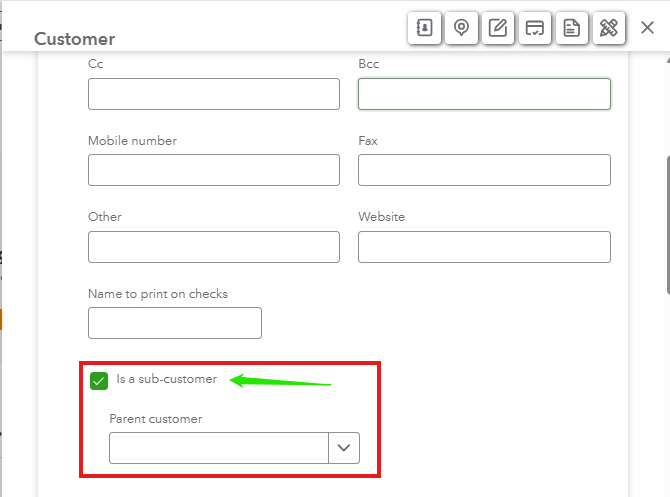
- Once done, hit Save.
You can also refer to this article for comprehensive instructions: Adding new customers in QuickBooks Online.
In case you want to change or add details to your customer's profile, you have the option to edit it in QuickBooks.
Do you have further questions or need additional assistance with? Please let us know in the comments below. The Community team is always available to help.
- Mark as New
- Bookmark
- Subscribe
- Permalink
- Report Inappropriate Content
Employees and payroll
Thanks that worked!


- Mark as New
- Bookmark
- Subscribe
- Permalink
- Report Inappropriate Content
Employees and payroll
You're always welcome, Sisonnn!
Thanks for letting us know how it went—we truly appreciate your input.
Feel free to reach out anytime if you need more help with managing customers in QuickBooks. We're here for you!
