
- Mark as New
- Bookmark
- Subscribe
- Permalink
- Report Inappropriate Content
Why can I not post to the community forum. i keep getting " Authentication Failed "Authentication Ticket Mismatched, failed authentication.Return to my original page
Solved! Go to Solution.


- Mark as New
- Bookmark
- Subscribe
- Permalink
- Report Inappropriate Content
Account management
I’ll help you post in the QuickBooks Community forum, LDO.
Let’s determine whether this is a web application issue. Start by logging out and logging back in. Then, refresh the page to ensure it updates properly. Once done, access the forum and attempt to post again.
If the same error occurs, clear your browser’s cache to remove outdated files and improve performance. Next, confirm that you’re using a supported and updated browser for optimal compatibility with QuickBooks.
Feel free to reach out if you encounter any other issues. I’m here to help.
- Mark as New
- Bookmark
- Subscribe
- Permalink
- Report Inappropriate Content
Account management
SOLVED!!!
Here is the solution: Delete your browsing history. Amy from Quickbooks time support told me this. She said she deletes her browsing history everyday for optimum performance. I deleted it yesterday and It worked, but then I had the same problem again. I guess I am going to have to delete it everyday just like Amy said.
Thanks,
LDO

- Mark as New
- Bookmark
- Subscribe
- Permalink
- Report Inappropriate Content
Account management
I tried deleting all history as well as all searches. Made all other tasks more difficult and still no lcuk signing into community

- Mark as New
- Bookmark
- Subscribe
- Permalink
- Report Inappropriate Content
Account management
I appreciate the effort, @MVEBA. I understand how important it is to sign in to the Community forum. Please ensure to follow my colleague’s suggestion to use a different browser or you can open an incognito/private window which disables extensions and then attempt to sign in.
If you’ve already done that and are still unable to sign in, please reach out to our QuickBooks Live Support Team, they can also help you resolve Community sign‑in concern. To contact support, follow these steps:
- Click the (? Help) icon in your QuickBooks Online account in the top-right corner.
- Select Contact Us, then enter a short description of your concern.
- Choose Chat with us to start a live chat with an agent or request a callback for phone support.
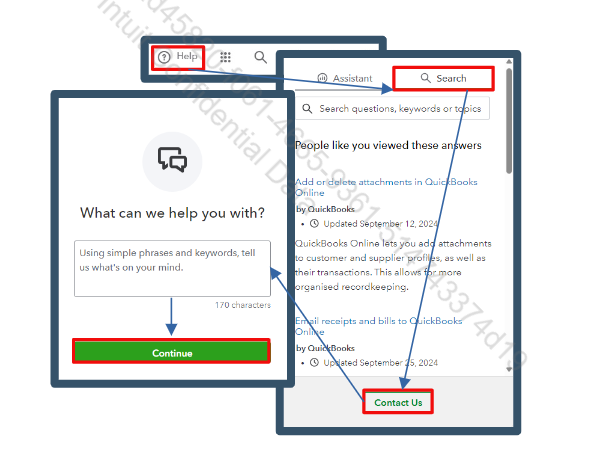
You can also check our support hours to know our support availability time: Get help with QuickBooks products and services.
Let us know if you have further questions, we'll be right here to help you anytime.
- Mark as New
- Bookmark
- Subscribe
- Permalink
- Report Inappropriate Content
Account management
Try opening QB Community on your private/incognito browser.
