

- Mark as New
- Bookmark
- Subscribe
- Highlight
- Report Inappropriate Content
Account Management
Hi there, @Rosieb. Let me guide you in marking your invoice as paid in QuickBooks Online (QBO).
In QBO, you can mark an invoice as paid without a connected bank account unless you're making a deposit. In your case, you can use the Receive payment option to keep track of your customer's balances.
Here are the steps to follow:
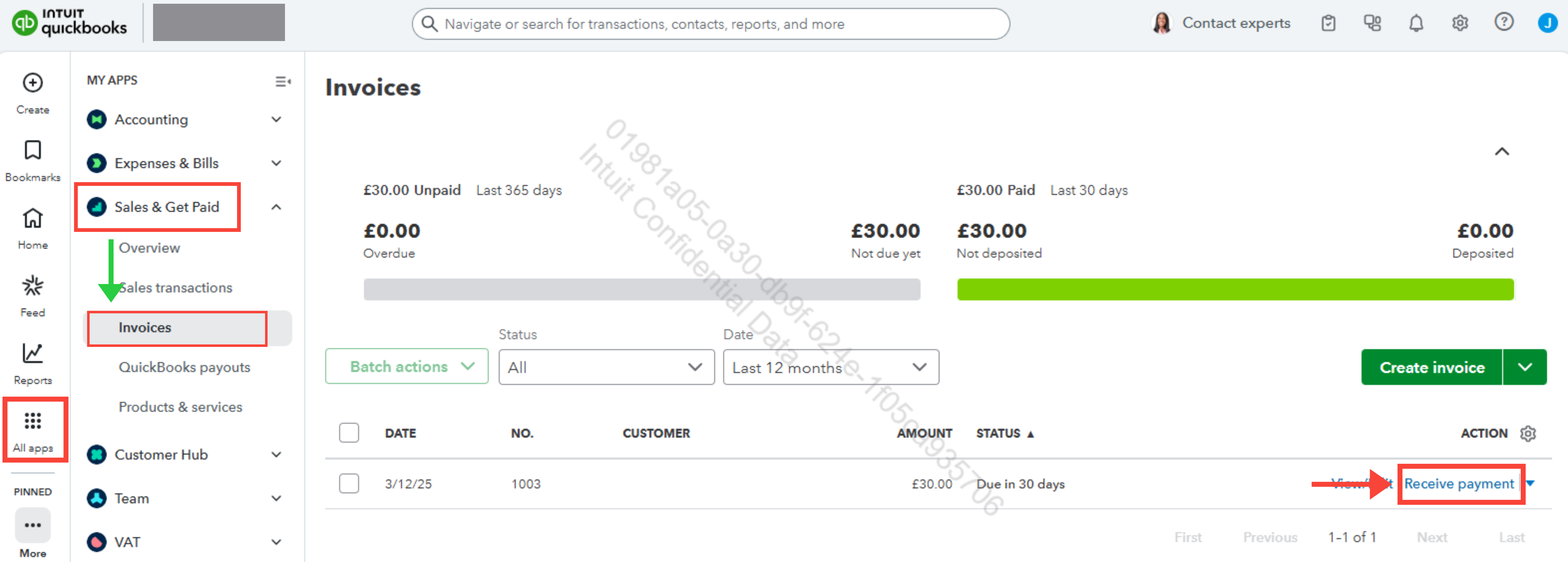
- Navigate to the All Apps tab.
- Select Sales & Get Paid, then click Invoices.
- Locate the invoice you want to mark as paid, then click Receive payment.
- Enter the customer’s name in the Customer field and complete any required details.
- Check the box for the invoice you want to record.
- Save and Close once done.
If you need further assistance, feel free to reply to this thread. We're here to help.
0 Cheers
