
Turn on suggestions
Auto-suggest helps you quickly narrow down your search results by suggesting possible matches as you type.
Showing results for
Welcome to Community, @slloyd-ellcoja-c.
I'll share some information about late fees. While the option for automatic late fees isn't available in the international version, you'll want to add the fees manually in the invoice. Let me walk you through how to do it.
After that, manually add the service item to the invoice. See the attached screenshot below.
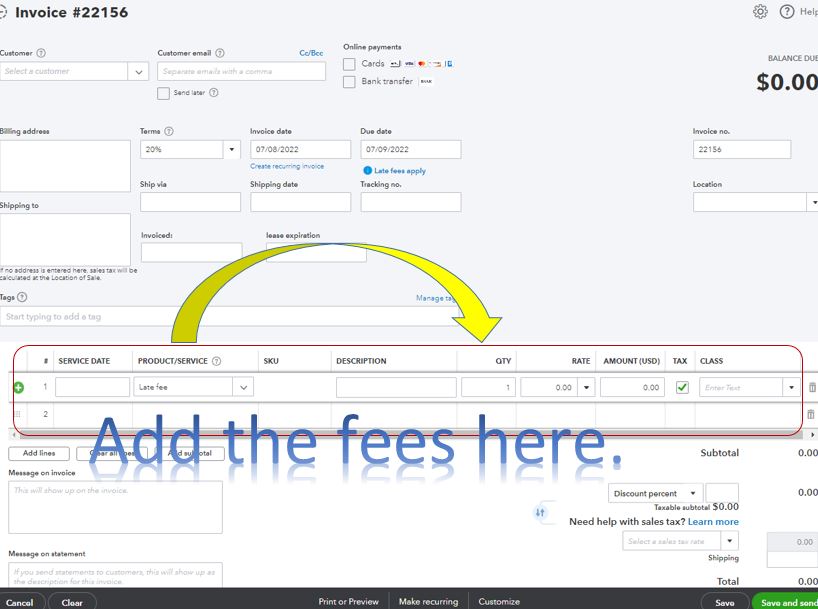
For more information about product or service item, check out this article: Add product and service items to QuickBooks Online.
In addition, you can view our Community help articles for QuickBooks Online International. It has topics with articles, videos, and post with our Community users to guide you along.
Please know that you can always reply to this thread if you need help with invoices or with late fees. I'll be around for you. Take care and have a good one.
You have clicked a link to a site outside of the QuickBooks or ProFile Communities. By clicking "Continue", you will leave the community and be taken to that site instead.
For more information visit our Security Center or to report suspicious websites you can contact us here


