
Turn on suggestions
Auto-suggest helps you quickly narrow down your search results by suggesting possible matches as you type.
Showing results for
Welcome to the Community, @absmotorworks.
Adding users to your QuickBooks Online account is a great idea as it helps your team collaborate efficiently. You can assign roles like Accountant, Standard User, or Custom User to manage transactions, track finances, and generate reports securely, while ensuring the protection of sensitive data. I’m here to guide you through the process step by step.
Here's how:
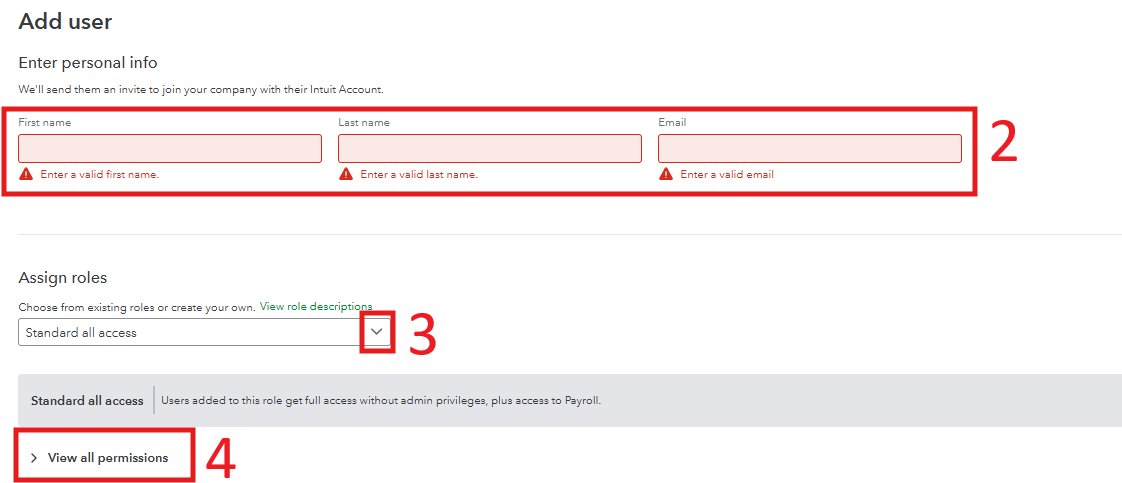
QuickBooks Online has usage limits based on your subscription plan. These limits determine the number of billable users you can add. This guide provides an overview of these limits and tips for managing them effectively: Learn about usage limits. If you need to add more users beyond the limits of your current subscription, you can easily upgrade your plan to accommodate your growing needs.
If you have any questions or need further assistance with adding or managing users, feel free to reach out. We’re here to help you every step of the way and ensure your QuickBooks Online experience is seamless and fits your needs perfectly.
You have clicked a link to a site outside of the QuickBooks or ProFile Communities. By clicking "Continue", you will leave the community and be taken to that site instead.
For more information visit our Security Center or to report suspicious websites you can contact us here


