
Turn on suggestions
Auto-suggest helps you quickly narrow down your search results by suggesting possible matches as you type.
Showing results for
Hello Experts,
We print custom books for our customers and we accept Cash on Delivery.
Because we ship internationally to a limited number of countries, we assigned someone as a medium in each country, we call him a distributor.
So, we'll print books for multiple customers in the respective country and at the end of the week we combine the orders in 1 big box and send it to the distributor to ship the orders locally to customers and collect payments.
At the end of the month, we ask the distributor to pay us the amounts collected (minus) their percentage say 20%.
I really can't wrap my head around it, in the big picture the distributor is a vendor (provides us shipping and collection services) but our customers' invoices needs to be settled by him and his 20% is COGS.
How would you setup QuickBooks to handle it?
P.s. I'd like to look at the P&L and see it grouped by country.
Thanks in advance,
Amin
Hi there, Zekra.
I'll provide steps on how you can handle the total amounts collected a minus percentage of 20% for a contributor.
I suggest creating a Bundles item to track a sale, and a vendor commission for that sale, at the same time. You'll need first to create an Income Account to track your Bundle.
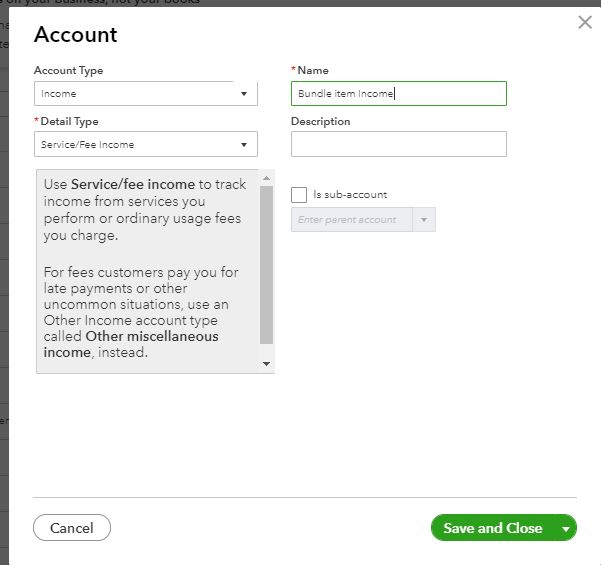
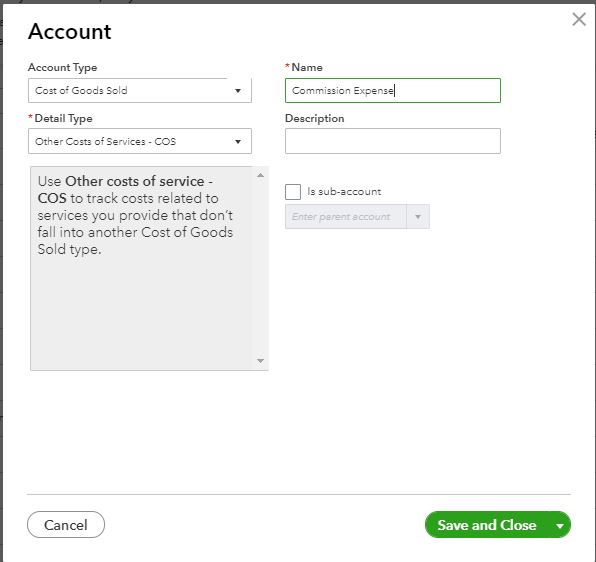
Then, create an Expense Account or Cost of Goods Sold Account to track the vendor expense. And, create an Expense Account or Cost of Goods Sold Account to track the vendor expense. NOTE: You’ll want this to be an Other Current Liability, and you’ll need one for each vendor to whom you pay commission.
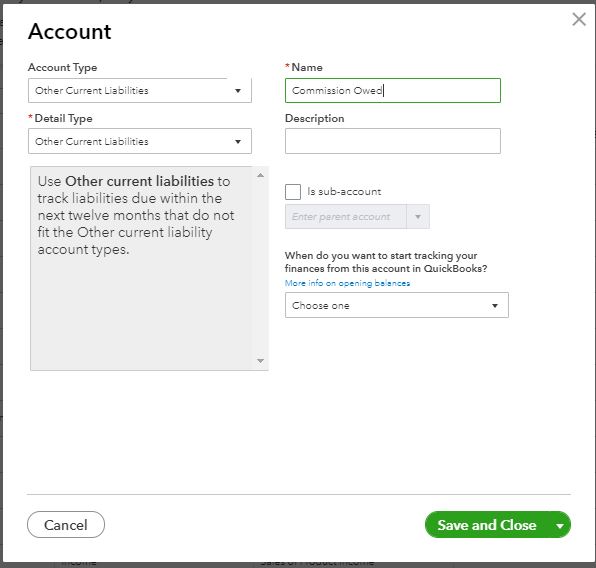
Once done, create a Liability Account to track the vendor commission that is owed. NOTE: You’ll want this to be an Other Current Liability, and you’ll need one for each vendor to whom you pay commission. Then, create the item(s) for which your vendor is earning a commission. Make sure you point this to the proper Income Account. Your item will either be Inventory, non-inventory, or service, depending on what you’re selling, so choose the item type as needed. While you’re still in the Products & Services list screen, create a new SERVICE item to track the vendor expense and you’ll choose the Commission Expense account you created. Click Save and New when you’re done.
For additional information and to finish the process, you can click this article: Using Bundles to Track Vendor Commissions.
For your other concern, there's no option in P&L to show or grouped it by country. However, you can generate a Customer Contact List report to have your customers’ shipping address.
Follow these steps to have this report:
For further details to guide you with QuickBooks reports, please check the articles below.
I'm always here if you need more help with your report. Take care and have a wonderful day!
You have clicked a link to a site outside of the QuickBooks or ProFile Communities. By clicking "Continue", you will leave the community and be taken to that site instead.
For more information visit our Security Center or to report suspicious websites you can contact us here


